Admins: 3 DNS Records That Make Custom Domain Sending Work

Yes, to send reliably from your brand you need a dedicated sending hostname, usually a subdomain, with SPF, DKIM, and DMARC published in DNS and a MAIL FROM MX when your provider requires one. Verify each record in your provider’s dashboard, warm the domain with a slow ramp, and watch bounce and complaint rates before you send at volume. Skip the verification step and your mail either lands in spam or never leaves the queue. One risk trips up almost everyone: touching your root domain’s existing MX or inbound mail records while you’re setting this up.
TL;DR:
- Use a dedicated subdomain for sending, such as mail.yourcompany.com, to isolate reputation from your main domain and prevent deliverability issues.
- Publish correct SPF, DKIM, and DMARC DNS records, ensuring no multiple SPF TXT records exist and that DMARC alignment is properly configured.
- Verify domain ownership through your provider’s dashboard and carefully monitor bounce and complaint rates during gradual warm-up, typically over two to three weeks.
- Avoid using root domains for sending to minimize the risk to your main email reputation, and choose descriptive subdomains that clearly distinguish email types.
- Consider alternative solutions like platforms that handle branded follow-up without DNS management if ongoing domain maintenance exceeds your team’s capacity.
Table of Contents
- What Is Custom Domain Sending and Why Does It Matter?
- Should You Use a Subdomain or Your Root Domain?
- What DNS Records Do You Need for Custom Domain Sending?
- How Do Different Providers Handle Domain Verification?
- How Long Does Domain Warm-Up Take and What Should You Monitor?
- What Should You Check When Domain Verification Fails?
- How Does Custom Domain Sending Fit Your Sales Stack?
- What I’d Prioritize First if I Were Setting This Up Today
- A Different Route: Branded Follow-Up Without Managing DNS Yourself
- Sources
- FAQ
What Is Custom Domain Sending and Why Does It Matter?
Custom domain sending means your outbound mail carries your own domain, not a shared platform address, and it’s authenticated well enough that inbox providers trust it. That trust is the entire point. When Gmail or Outlook sees mail from mail.yourcompany.com with valid SPF, DKIM, and DMARC records, it treats your messages as coming from a real, accountable sender instead of an anonymous script.
This matters more than most IT admins realize until they’ve watched a campaign die in spam folders. A domain with no sending history is unknown to inbox filters. A domain sharing infrastructure with careless senders inherits their bad reputation. That’s the core reason Buttondown recommends a dedicated sending domain: it isolates your reputation so you’re never penalized for someone else’s spam complaints.
The standard industry term for this is domain-based email delivery, and it covers three related jobs: choosing the right sending hostname, publishing the DNS records that prove ownership and authorization, and monitoring the result. Get all three right and you’ve solved deliverability at the root, rather than chasing symptoms with better subject lines.
Should You Use a Subdomain or Your Root Domain?
Use a subdomain. Almost every credible sending guide converges on this, and for good reason: subdomains isolate sending reputation from your core inbound mail and your website’s domain trust. If a subdomain gets flagged for spam, your root domain and its email keep functioning normally. If you send from the root domain and something goes wrong, you risk your entire company’s email reputation, including the inbox where your CFO receives invoices.
Naming conventions matter more than they seem to. Good options:
mail.yourcompany.comormg.yourcompany.comfor general transactional and marketing mailoutbound.yourcompany.comfor programmatic sends- Separate subdomains per use case if you send both marketing newsletters and transactional receipts at scale
Avoid names that sound like an internal test, like test.yourcompany.com or temp-mail.yourcompany.com. They read as untrustworthy to both spam filters and any recipient who inspects the sender address. And skip “no-reply” as a local part wherever you can. It’s a small choice with an outsized effect on engagement. Recipients read “no-reply” as “we don’t want to hear from you,” which measurably suppresses replies and, over time, signals to inbox providers that your mail generates less interaction.
Your return path and reply-to address should feel intentional, not like plumbing. A branded return path (something like bounce.yourcompany.com) reinforces legitimacy, while a monitored reply-to address, even one that forwards to a shared inbox, keeps the human element of your brand visible in every message.
Pro Tip: Keep one subdomain for newsletters and a separate one for transactional receipts. If your newsletter reputation takes a hit from an aggressive send, your password reset emails keep landing in the inbox.
What DNS Records Do You Need for Custom Domain Sending?
Three records do the heavy lifting: SPF, DKIM, and DMARC. A fourth, an MX record on your MAIL FROM subdomain, comes into play depending on your provider.
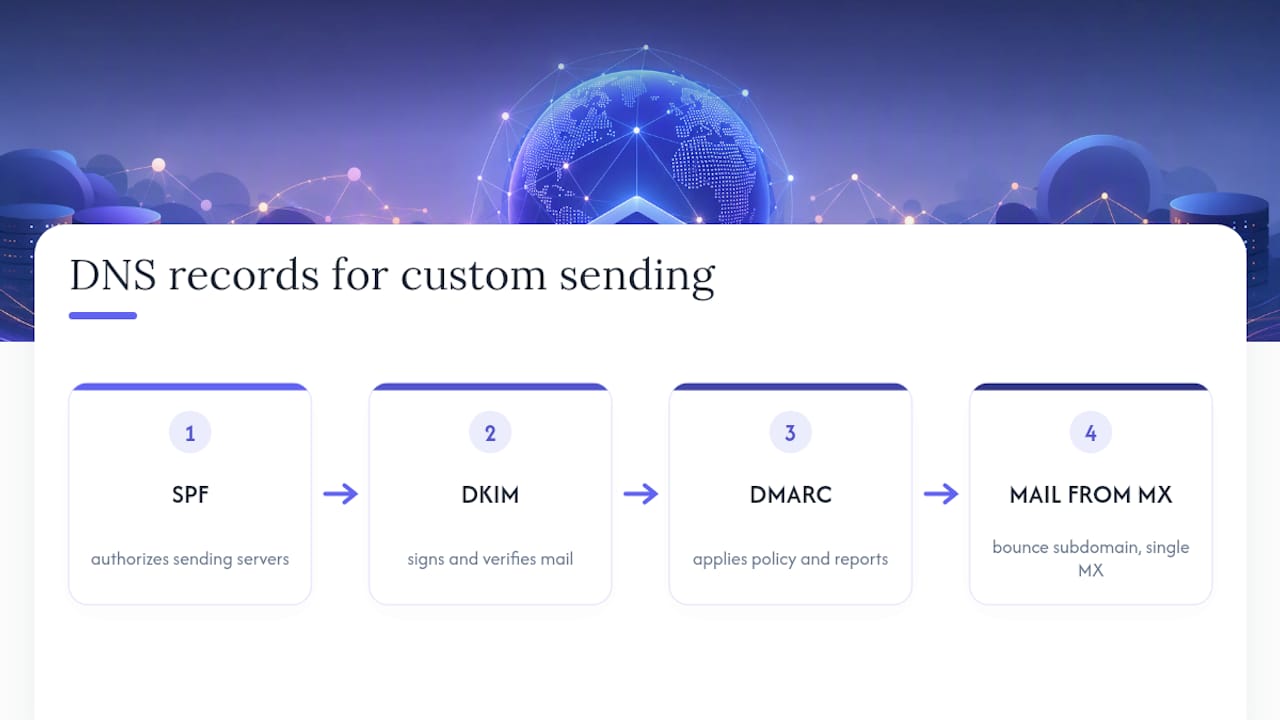
SPF (Sender Policy Framework) declares which servers are allowed to send mail for your domain. RFC 7208 defines the mechanism, and it also sets a hard limit: no more than 10 DNS lookups per SPF check, which trips up companies that stack multiple include: statements from different providers without consolidating them. A typical SPF TXT record looks like:
v=spf1 include:amazonses.com include:_spf.google.com ~all
If you already have an SPF record from Google Workspace or Microsoft 365, don’t create a second TXT record for your new sender. Merge the includes into one record. Multiple SPF TXT records on the same hostname is one of the most common misconfigurations admins hit, and it breaks validation silently.
DKIM (DomainKeys Identified Mail) signs your outgoing mail with a private key, and the receiving server checks that signature against a public key published as a CNAME or TXT record. Your provider generates a selector name, something like s1._domainkey.yourcompany.com, pointing to a value it hosts. After setup, send a test message to a tool like mail-tester.com or check headers manually. A valid DKIM signature shows dkim=pass in the received headers of the test message.
DMARC (Domain-based Message Authentication, Reporting and Conformance) tells receiving servers what to do when SPF or DKIM fails, and it reports back to you. Start conservative:
v=DMARC1; p=none; rua=mailto:dmarc-reports@yourcompany.com
p=none monitors without blocking anything, which matters because you’ll want data before you enforce a strict policy. Stripe’s own setup guidance recommends exactly this staged approach for transactional email: watch the rua reports for a few weeks, confirm your legitimate mail is passing, then move to p=quarantine and eventually p=reject.
Alignment is the piece that trips people up conceptually. DMARC doesn’t just check that SPF and DKIM pass; it checks that the domain in the visible From: header aligns with the domain authenticated by SPF or DKIM. That’s why the MAIL FROM address (the technical envelope sender, invisible to most recipients) can differ from your From: header, but the domains still need to align for DMARC to pass.
On MAIL FROM specifically: some providers require a dedicated subdomain here for bounce handling, and Amazon SES enforces a strict rule that only one MX record can exist on that MAIL FROM domain. Publish a second MX record, even accidentally, and SES setup fails outright, falling back to the default amazonses.com MAIL FROM or rejecting sends depending on your configuration. This single-MX requirement is the most-missed detail in AWS-based sending setups.
How Do Different Providers Handle Domain Verification?
Almost every provider follows the same five-step choreography: add your domain in the dashboard, get a list of DNS records to publish, add them at your registrar or DNS host, click verify, and decide whether to let the provider manage those records going forward or keep manual control.
- Add the domain. You’ll type in
yourcompany.comor your chosen subdomain, and the dashboard generates a unique set of records. - Publish the records. Copy each TXT, CNAME, or MX value exactly, watching for trailing dots or extra quotation marks your DNS host might add automatically.
- Verify. Click the provider’s verification button. This can take minutes or, in stubborn cases, up to 48 hours depending on propagation.
- Choose managed or manual DNS. Some providers offer to host your records for you going forward, trading control for convenience.
- Send a real test. Before touching your full list, send one message and inspect the raw headers for pass results.
The specifics diverge by provider. Cloudflare Email Sending creates its authentication records on a special cf-bounce subdomain and, once you’ve verified, locks certain records to prevent accidental edits. Cloudflare also separates Email Sending configuration from Email Routing, a distinction that trips up admins who assume routing setup covers outbound mail too. It doesn’t.
Amazon SES wants a custom MAIL FROM subdomain with exactly one MX record, and if you already run DNS through Route 53, SES offers a one-click “Publish Records” shortcut that writes everything for you instead of manual copy-paste.
Stripe requires a proof-of-ownership TXT record before it will even show you the rest, followed by a Mail From CNAME/MX pair and DKIM CNAMEs. Stripe’s own documentation is explicit that transactional senders should start DMARC at p=none rather than jumping straight to enforcement.
Resend leans toward subdomains by default and supports a custom return-path with a 63-character limit that must start with a letter, a small but real constraint if you’re scripting domain setup across many client accounts. Platforms like MailerSend and HighLevel follow similar patterns, and HighLevel specifically recommends separate subdomains per message type paired with a warm-up period before any large campaign.
How Long Does Domain Warm-Up Take and What Should You Monitor?
Warm-up isn’t optional, and rushing it is the single most common way a new sending domain gets flagged before it’s even proven itself. Inbox providers watch new domains closely, and a sudden spike in volume from an unknown sender looks identical to a spam operation, even when it isn’t.
A reasonable ramp starts small, often a few hundred messages a day to your most engaged contacts, doubling every few days as your bounce and complaint rates stay clean. HighLevel’s guidance frames this explicitly: warm the domain before pushing full volume, and use Google Postmaster Tools to track domain and IP reputation as you scale.
Three tools do most of the monitoring work:
- Google Postmaster Tools shows domain reputation, spam rate, and authentication results specifically for Gmail recipients, which is often your largest single mailbox provider.
- DMARC aggregate reports (the
ruaaddress from your DMARC record) show you, domain by domain, whether SPF and DKIM are passing at scale, not just in your one test send. - Manual SMTP test sends to seed accounts across Gmail, Outlook, and Yahoo confirm actual inbox placement rather than just technical pass/fail on authentication.
Watch bounce rate and complaint rate as your abort signals. Rising bounce rates or complaints should pause your ramp immediately. Fix the underlying list quality or sending pattern before resuming, rather than pushing through and hoping it self-corrects.
Pro Tip: Send your first week of volume only to contacts who’ve emailed you back before. Engagement signals from real replies do more for a new domain’s reputation than raw volume ever will.
What Should You Check When Domain Verification Fails?
Most verification failures trace back to a handful of repeat offenders, and working through them in order saves hours of dashboard refreshing.
Start with propagation timing. DNS changes don’t take effect instantly, and your record’s TTL (time to live) determines how long old values linger in caches worldwide. Use dig TXT yourcompany.com or nslookup from a terminal to check what’s actually live, rather than trusting your registrar’s dashboard, which sometimes shows a cached view of records you already changed.
Common mistakes worth checking first:
- Wrong record type: pasting a DKIM value into a TXT field when the provider expected a CNAME, or vice versa
- Wrong hostname: a typo in the selector name or subdomain, especially copy-paste errors that drop a trailing dot
- Multiple SPF TXT records on one hostname, which invalidates the check even if both records are individually correct
- Wildcard DNS records at your registrar silently overriding the specific record you just added
MAIL FROM failures deserve special attention. If you’re on a provider like SES that enforces a single-MX rule, check for a leftover MX record from a previous setup or a conflicting entry your DNS host added automatically. SES’s documentation is blunt about this: multiple MX records on the MAIL FROM domain will fail the check outright, no partial credit given.
How Does Custom Domain Sending Fit Your Sales Stack?
Self-managing a sending domain is a real operational commitment. Someone owns DNS changes, someone reads Postmaster reports weekly, and someone gets paged when a DMARC report shows a sudden spike in failures. That’s fine for a marketing team running high-volume newsletters, less fine for a five-person sales team already juggling a CRM, a dialer, and a meeting recorder.
The trade-off comes down to control versus overhead. Owning your domain gives you full authentication control and brand consistency down to the header. It also means you’re the one debugging a broken MX record at 6 PM before a big send. Platforms that bundle branded communication into the workflow reduce that burden, though they never eliminate the value of owning your own domain identity entirely.
A simple checklist for RevOps: confirm someone on the team can read a DMARC report without hand-holding, set a monitoring cadence (weekly at minimum during warm-up), and have a fallback sending path ready if your primary domain ever gets flagged; this is critical in AI Growth & Support Platform for SaaS Companies environments where reliable email delivery drives customer engagement.
What I’d Prioritize First if I Were Setting This Up Today
If you take away three things from all of this, make them these: use a subdomain, not your root domain. Authenticate fully with SPF, DKIM, and DMARC, don’t stop at just SPF because it’s the easiest one to configure. And warm the domain deliberately instead of flipping a switch on day one and hoping for the best.
The pitfall I see most often isn’t technical ignorance, it’s impatience. Teams get SPF and DKIM passing in a test send and assume the job’s done, then blast a full contact list the same afternoon. The domain has zero sending history at that point, and inbox providers treat that impatience as suspicious behavior, not enthusiasm.
Start small: one subdomain, three DNS records, one test message, then a slow ramp over two to three weeks while you watch Postmaster Tools and your DMARC reports. That sequence, done in order, is what separates a domain that inboxes reliably from one fighting spam folders for months.
— Daniel
A Different Route: Branded Follow-Up Without Managing DNS Yourself
If everything above sounds like exactly the kind of ongoing DNS maintenance your sales team doesn’t have bandwidth for, there’s another path. Some platforms handle branded follow-up as part of an integrated workflow instead of requiring you to manage SPF records, DKIM selectors, and warm-up schedules for a sales team’s outbound mail.

Trailercast turns call transcripts and demo recordings into AI-edited demo trailers and branded follow-up sequences that reach your buying committee without you configuring a separate sending domain for every campaign. For a sales team choosing between running its own DNS setup or plugging into a platform that already handles branded delivery, the calculation is straightforward: DIY gives you granular control, some platforms give you one workspace that includes the follow-up piece. If your team’s core problem is deals stalling between calls rather than mail server configuration, that’s the sharper fix.
Teams with dedicated IT resources and high-volume marketing needs still benefit from owning a sending domain outright. But if your bottleneck is champions going quiet after a great demo, not deliverability infrastructure, start a Trailercast trial and see what a single workspace looks like for the whole deal cycle.
Sources
- Domain configuration — Cloudflare Email Service
- Set up a custom email domain (Stripe)
- Sending from a custom domain (Buttondown)
FAQ
How Do I Send an Email From a Custom Domain?
Add a sending subdomain, publish SPF, DKIM, and DMARC records in your DNS, verify the domain in your email provider’s dashboard, then warm it gradually before sending at volume.
What Is a Sending Domain?
A sending domain is the hostname, often a subdomain like mail.yourcompany.com, that your outbound mail uses so inbox providers can authenticate and build a reputation for it separate from your main domain.
Is There a Free Custom Email Domain Option?
Most domain registrars charge a small annual fee for the domain itself, but many email providers, including Cloudflare and Resend, let you verify and send from that domain at no extra cost beyond your existing plan.
What Is the Most Hacked Email Provider?
There’s no single definitive, sourced ranking of “most hacked” email providers, and any list depends heavily on the timeframe and breach type being measured. What matters more for your setup is that strong SPF, DKIM, and DMARC enforcement on your own domain protects you regardless of which mailbox provider your recipients use.
Do I Need an MX Record for a Custom Sending Domain?
Only if your provider requires it for MAIL FROM handling. Amazon SES, for example, requires exactly one MX record on the MAIL FROM subdomain, and publishing more than one will break the setup.