Close Deals Faster for B2B SaaS with Demo Recap Videos in Minutes
A demo recap video is a short, stakeholder-targeted clip built from a recorded demo, typically 60 to 120 seconds for the hero cut and 15 to 45 seconds for social-ready cutdowns. It replaces the long follow-up email nobody reads, gets champions to actually forward it, and usually takes minutes to a few hours to produce once the recording and highlights are in hand.
TL;DR:
- Recap videos are most effective when kept between 60 to 120 seconds for sales demos and tailored to stakeholder needs, such as ROI for CFOs or security for CISOs.
- Using transcript search or AI can speed up highlight selection, enabling production within minutes, and should be shared immediately after the demo for maximum impact.
- Multiple clips are better for multi-speaker events, while a single hero clip suffices for straightforward narratives like sales or sprint reviews.
- Personalized cutdowns targeting specific personas, with captions and branding, improve engagement and follow-up accuracy.
- An integrated platform that combines recording, editing, hosting, and analytics streamlines the process and enhances tracking stakeholder engagement and deal progress.
Table of Contents
- What Is a Demo Recap Video?
- Where Recap Videos Actually Get Used
- How Do You Build a Demo Recap Video Fast?
- Best Practices for Length, Structure, and Personalization
- What Features Actually Matter in a Recap Tool
- How an Integrated Platform Owns the Space Between Calls
- Ship a Recap in Three Steps: A Quick Template
- Why Recap Videos Change What Happens After the Call
- Try Trailercast’s Built-In Recap Workflow
- Sources
What Is a Demo Recap Video?
A demo recap video takes a 45-minute demo recording and turns it into something a busy VP will actually watch, unlike a full recording that typically goes unwatched or an email that lacks tone and key moments
The gap between those two options is where deals quietly stall. Your champion sits in the demo, gets excited, then has to walk back into their organization and re-sell what they just saw, from memory, to people who weren’t there. A recap video hands them something to forward instead of something to explain.
What buyers and internal teams expect from a solid recap:
- A hero clip running 60 to 120 seconds that hits the core value proposition
- Cutdowns of 15 to 45 seconds for Slack threads, LinkedIn, or a quick text to a stakeholder
- Burned-in captions so it plays silently in an open office or on a phone during a commute
- A clean intro/outro with your branding so it doesn’t look like a random screen recording
An AI-driven workflow can produce that 90-second follow-up in minutes rather than the 30 to 45 minutes a manual recap write-up typically demands, and the shorter format tends to get forwarded further inside the buying committee than a transcript ever does.
Where Recap Videos Actually Get Used
Not every recap should look the same. The right shape depends entirely on who’s watching and why, and treating a sprint demo recap the same as a sales follow-up is a common way to waste the format’s value.
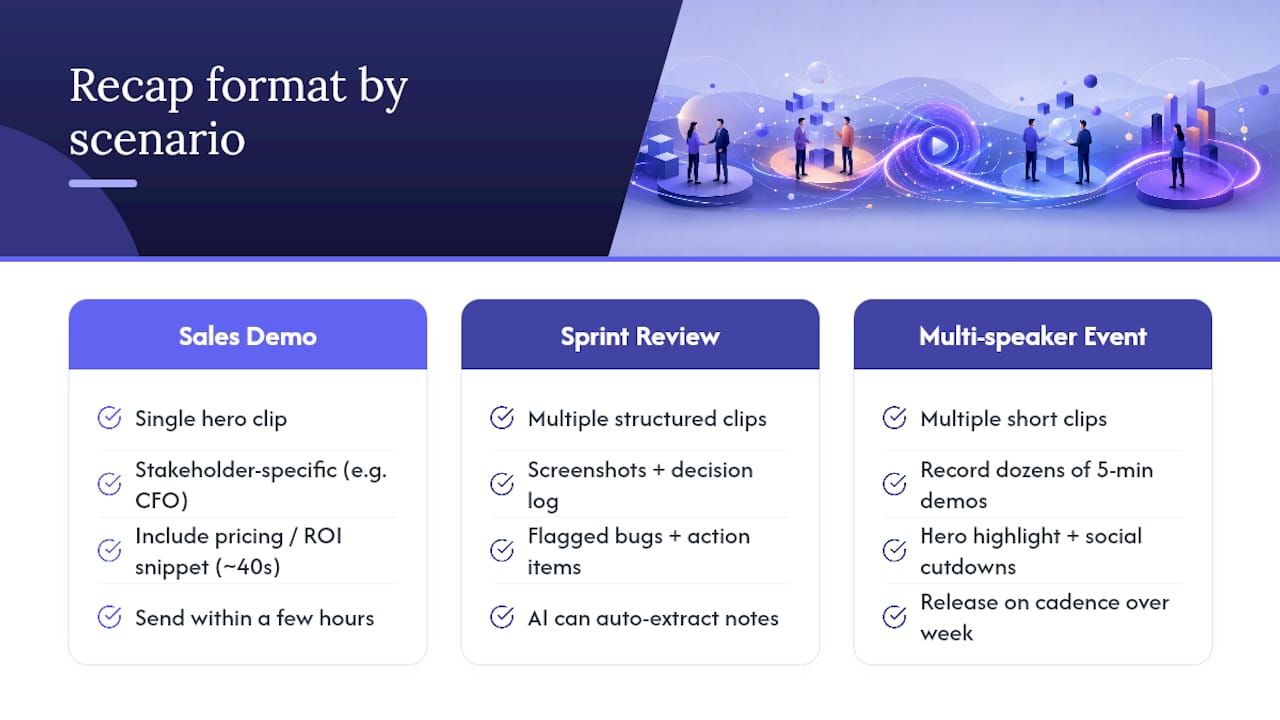
Sales demo follow-ups need to be stakeholder-specific. A CFO doesn’t need the integration walkthrough; they need the 40 seconds where you covered pricing and ROI. Send it within a few hours of the call, while the conversation is still fresh enough that the recipient remembers the context your champion gave them.
Sprint and product demos call for a different structure entirely. Engineering and product teams don’t want a highlight reel; they want screenshots, a decision log, flagged bugs, and a clear list of next steps. AI tools can now convert a sprint demo recording into that structured document automatically, pulling out quotes and action items so nobody has to rewatch the full session to remember what was decided.
Event recaps work best as a single hero highlight paired with several short social cutdowns released on a cadence over the following week, rather than one long video dumped all at once. Event demo nights are a good example: dozens of five-minute demos get recorded live, then repackaged into highlight reels for YouTube and LinkedIn long after the event ends.
A rule of thumb: use a single hero clip when there’s one clear narrative arc (a sales demo, a sprint review). Switch to multiple clips when the source material has several distinct, unrelated moments worth surfacing on their own, like a multi-speaker event.
How Do You Build a Demo Recap Video Fast?
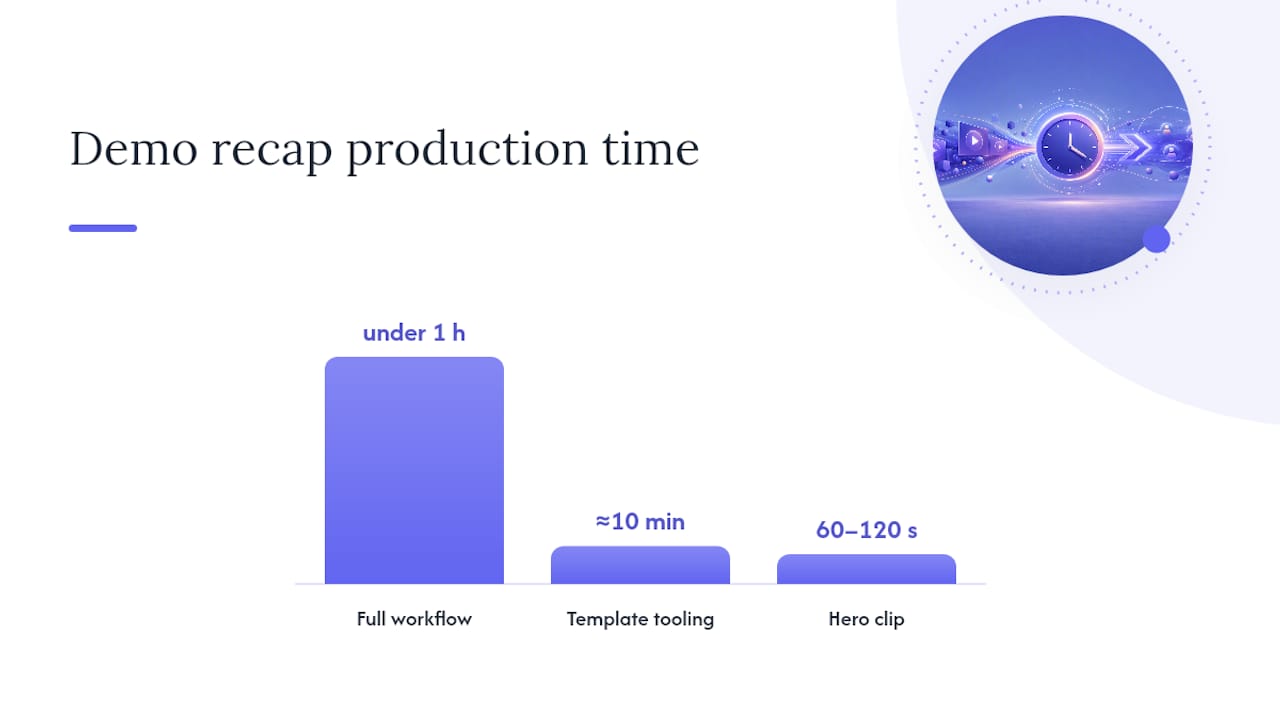
You don’t need an editing background to ship a recap the same day the demo happens. The workflow breaks into five steps, and most SaaS teams can run through all of them in under an hour once they’ve done it a couple of times.
- Capture the recording and its metadata. Grab the recording along with the date, attendees, and deal stage. If you used a browser-based recorder with no install required, this step is already done before the call even ends.
- Surface the highlights. Instead of scrubbing through 45 minutes manually, use transcript search or AI moment detection to jump straight to the parts that matter: pricing discussion, integration questions, objections, and the moment the prospect said something close to a buying signal.
- Edit by transcript, not timeline. Editing off the transcript text is faster and more accurate than eyeballing a timeline, because you can literally read the conversation and click the line you want to cut to. Assemble your 60 to 120 second hero clip from three or four of those moments.
- Add captions and persona cuts. Burn in captions, drop in a branded intro/outro, and if you’re sending to multiple stakeholders, cut a second version that leads with security instead of pricing. Export in whatever format your delivery channel needs.
- Share it through the right channel and watch what happens next. A link in a deal room or a Slack message beats an email attachment almost every time, and if your tool tracks opens or plays, you get a signal for when to follow up.
Template tools with auto-cut and captioning features have made this entire process accessible to people with zero editing experience, cutting event highlight production down to roughly ten minutes for a polished result.
Pro Tip: Ask your AE to drop a quick calendar note or verbal marker (“this is the pricing section”) during the live demo. A repeatable agenda with built-in markers cuts highlight-selection time dramatically, because you’re not hunting for the good part later.
Best Practices for Length, Structure, and Personalization
Length discipline is the single biggest lever you have. A recap that runs long defeats its own purpose, no matter how good the content is.
Match the length to the channel:
- Email: 60 to 90 seconds, embedded or linked, never a raw attachment
- Slack or Teams: 15 to 30 second cutdowns that make sense with sound off
- LinkedIn: 30 to 45 seconds, captioned, framed for a cold scroll
- Deal room: the full 60 to 120 second hero clip, since visitors there are already engaged
For a 90-second recap, a simple three-part shape works better than trying to summarize everything: hook (the one line that states what problem this solves), evidence clip (the actual demo moment that proves it), call to action (what you want the viewer to do next). Resist the urge to cram in five different features. One clear thread beats a highlight reel of unrelated moments.
Personalize by persona whenever the deal has more than two stakeholders. A CFO cut should open on ROI and pricing. A CISO cut should open on the security architecture question, not the UI walkthrough. IT leads usually want the integration and API section front and center. Sending the same generic clip to everyone on a buying committee is the same mistake as sending everyone the same generic slide deck.
Accessibility matters more than most teams assume: burn in captions by default, since templated recap tools increasingly build captioning in as a standard step, not an afterthought, and keep on-screen text minimal so the clip doesn’t turn into a slide someone has to pause to read.
Timing closes the loop. Send within hours of the call, not days, and if your platform shows you when a stakeholder actually opened or played the clip, that engagement signal is your cue for exactly when to follow up, not a generic “just checking in” three days later.
What Features Actually Matter in a Recap Tool
Buyers evaluating recap software tend to get distracted by flashy demos instead of checking whether the tool covers the categories that determine whether a recap actually gets made and actually gets watched.
- Moment detection and transcript editing. The tool should let you find and cut clips by reading text, not scrubbing a timeline frame by frame.
- Smart zoom and cursor smoothing. For screen-share demos, jittery mouse movement and tiny UI text ruin an otherwise good clip; look for automatic zoom on the active window.
- Brand kit and multi-language narration. Consistent intro/outro branding and, increasingly, AI narration in multiple languages so a single trailer can serve international stakeholders without a re-record.
- Persona-targeted cutdowns with hosting. The ability to generate more than one cut from the same source and host them somewhere trackable, not just export raw files.
- Engagement analytics. Knowing who opened the clip, how far they watched, and whether they forwarded it is the difference between guessing at buyer intent and actually seeing it.
- Calendar and CRM integrations. Auto-scheduling through Google or Microsoft calendars and native syncing with your CRM removes the manual logging step that kills adoption.
How an Integrated Platform Owns the Space Between Calls
Most teams building recaps today stitch together three or four separate tools: one for recording, one for editing, one for hosting the deal room, one for tracking who opened what. Every handoff between those tools is a place where context gets lost.
Trailercast was built around a different premise: the calls were never the real problem. It’s the gap between them, where a champion has to walk back to a CFO who wasn’t in the room, that kills deals. The platform runs the whole lifecycle in one workspace. An AI notetaker joins the call, transcribes it, and feeds a Deal Brief that spans every conversation in the opportunity. From that recording, the AI selects the 8 to 15 minutes that mattered and builds a branded demo trailer, personalized per stakeholder, so a CFO gets a cut about pricing and a CISO gets one about security architecture.
That trailer lands in a shared decision room, not a random email thread, where:
- Champion forwarding is tracked as an attribution tree, showing exactly who shared the recap with whom
- Engagement analytics flip on the moment a prospect presses play, showing per-stakeholder activity in real time
- eSignature happens in the same workspace, so closing doesn’t require a hop to a separate tool
- A Handoff Brief fires automatically to Customer Success the moment the contract signs, carrying the stakeholder map and every promised feature
Pro Tip: If you’re only tracking whether an email got opened, you’re missing the real signal. Watch which specific stakeholder plays the recap and how far they watch. That tells you who’s actually driving the internal decision.
Ship a Recap in Three Steps: A Quick Template
You don’t need a polished script to get a recap out the door today. Use this bare structure and fill in your own details:
- Storyboard (3 lines): Hook, “Here’s how [product] solves [specific problem you discussed].” Proof clip, the 20 to 30 second demo moment that shows it working. CTA, “Let’s set up 15 minutes with your team to walk through next steps.”
- Subject lines: Try “Quick recap from our call, plus the part your team should see” or “60 seconds on what we covered today.”
- Distribution checklist: Host it somewhere trackable, export a captioned cutdown for Slack, confirm the send happens within a few hours of the call, and set a calendar reminder to check engagement data before your next follow-up.
Why Recap Videos Change What Happens After the Call
Most deals don’t die in the demo. They die in an internal meeting you weren’t invited to, where your champion tries to reconstruct forty minutes of nuance from a page of notes. A recap video closes that specific gap. It’s not about making prettier content; it’s about giving your champion something they can forward without having to translate it themselves.
If you want proof beyond the logic here, look for case studies and adoption numbers from teams that have made recaps part of their standard follow-up process . The pattern tends to hold: shorter, targeted, faster-sent content gets watched, and watched content gets forwarded.
— Daniel
Try Trailercast’s Built-In Recap Workflow
Trailercast is the integrated alternative to stitching together a recorder, an editor, a deal room, and an analytics dashboard separately for every demo recap you send. Instead of exporting a clip and then hunting for a way to see who watched it, the trailer, the tracking, and the eventual handoff to Customer Success all live in the same workspace from the first call.

That consolidation is the whole point: faster stakeholder alignment because the recap ships in minutes, tracked forwarding because every share shows up in the attribution tree, and a smoother handoff because Customer Success gets the full deal context automatically instead of running a cold discovery call. Pricing is one tier with everything included, no feature gating, at $79 per seat per month, or $59 billed annually. There’s a free trial with no credit card required, so you can run your next demo through the Trailercast platform and see the trailer land in a decision room before your prospect’s calendar even clears for the follow-up call.
Sources
- Ngram
- Turn Sprint Demo Recordings into Structured Recaps
- Veed
- What 21 five-minute demos looked like at WorkOS Demo Night — WorkOS