How to Send Video to Prospects and Actually Get Replies

The fastest, highest-ROI way to send a video to a prospect is a 45–75 second personalized clip, hosted behind a tracked browser-playable link, with a thumbnail that shows the prospect’s name or company and a single CTA. Not an attachment. Not a generic screen recording. A short, specific video that signals you did your homework before hitting record.
Before you send anything, run through this checklist:
- Personalized thumbnail: prospect’s name, company logo, or a screenshot of their website visible before they click
- First-5-second hook: say their name, your company, and one specific observation about their business
- Tight script: one proof point or relevant outcome in the middle, one low-friction CTA at the close
- Link, not attachment: Gmail caps attachments at around 25 MB, and even a 60-second 1080p video can hit that ceiling
- Tracking enabled: you need to know who played it, when, and how far they watched
That’s the recipe. Everything below explains why each element works, how to script it, which channel to use, and how to scale it without losing the personal signal that makes video outreach worth doing in the first place.
Key Takeaways
Personalized video outperforms text in B2B outreach because the personalization signal drives reciprocity, and the tracking data turns follow-up from guesswork into a repeatable, measurable process.
| Point | Details |
|---|---|
| Keep videos short and specific | Cold outreach videos should run 45–75 seconds; follow-ups compress to 30–40 seconds. |
| Personalization drives the lift | A thumbnail with the prospect’s name or company and a named first-5-second hook are the highest-leverage elements. |
| Always send a tracked hosted link | Email attachments hit Gmail’s 25 MB cap and strip your tracking; a hosted link gives you play rate, watch depth, and CTA clicks. |
| Scale with AI when volume demands it | AI personalization workflows reduce per-contact video time from minutes to seconds while preserving the personalization signal. |
| Trailercast consolidates the stack | Trailercast replaces five separate tools with one workspace covering browser recording, AI-edited trailers, tracked async video, decision rooms, and eSignature. |
Table of Contents
- Why does sending personalized video to prospects outperform plain text?
- What should you actually record? Structure, length, and opening hook
- Scripts, subject lines, and thumbnail text you can copy right now
- Which channel should you use, and how do you send it technically?
- What hosting and tracking features do you actually need?
- How do you scale personalized video without recording 200 individual clips?
- What metrics should you track, and what does a good follow-up cadence look like?
- Common mistakes, privacy notes, and a quick best-practices checklist
- How does Trailercast fit into the send-video-to-prospects workflow?
- A rapid test you can run this week
- Trailercast consolidates the entire video prospecting stack
- Sources
Why does sending personalized video to prospects outperform plain text?
The short answer: video triggers attention and perceived effort in a way that a cold email simply cannot. When a prospect sees their own name in a thumbnail and hears a rep address them by name in the first three seconds, the brain processes it differently than a mail-merged “Hi {{FirstName}}” opener. It reads as effort. Effort drives reciprocity.
The data backs this up. HubSpot’s sales blog notes that short, personalized videos are consistently more memorable and help build rapport during outreach, especially for introductions and follow-ups. Vendors in the video prospecting space report meaningful reply-rate uplifts when reps switch from text-only sequences to sequences that include at least one personalized video touch, though results vary by industry, list quality, and script quality.
Personalized video outperforms generic video almost as much as generic video outperforms plain text. The personalization is the lift driver, not the format alone.
The psychological mechanics are worth understanding because they tell you when to use video and when not to:
- Attention: motion and a face capture attention in an inbox full of static text
- Memory: people retain more from video than from text, which matters when your champion needs to re-sell your solution internally
- Perceived effort: a 60-second video signals more investment than a 60-word email, which creates a social obligation to respond
- Trust: seeing a real person builds credibility faster than any written claim
Where video tends to underperform text: high-volume, low-personalization sends. A generic screen recording sent to 500 contacts at once reads as spam with a play button. Use video where you can inject at least one specific signal per recipient.
What should you actually record? Structure, length, and opening hook
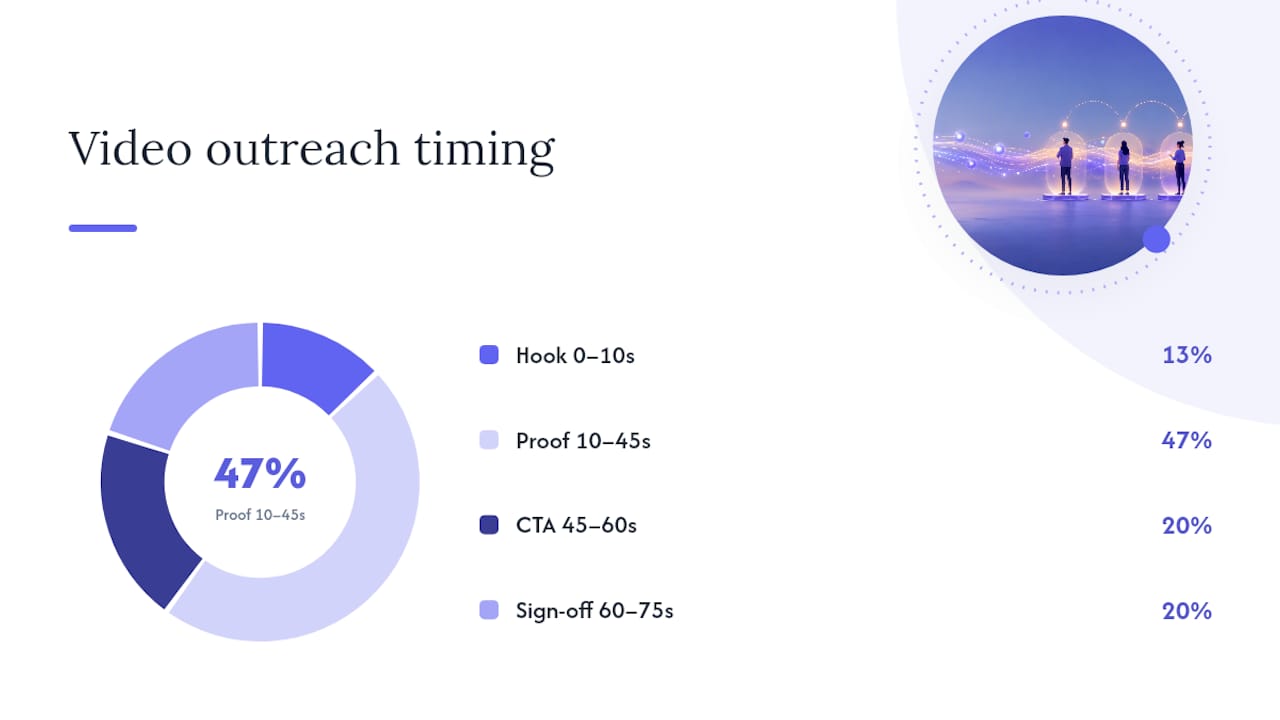
The structure that consistently works for cold video outreach is four beats, delivered in under 75 seconds.
Beat 1 — The hook (0–10 seconds): Say their name, your name, and one specific observation. “Hey Sarah, I noticed [Company] just expanded into the enterprise segment” lands better than “I’m reaching out because I think we could help.” Vidyard’s research confirms that putting the prospect’s name or company on screen in the opening, or saying it immediately, drives significantly higher click-through and play rates.
Beat 2 — The proof point (10–45 seconds): One relevant outcome, not a feature list. “We helped a team your size cut their demo-to-close cycle by about three weeks” is a proof point. “We have AI-powered conversation intelligence” is a feature. Prospects care about outcomes.
Beat 3 — The CTA (45–60 seconds): One ask, low friction. “Does Thursday at 2 PM work, or is there a better time?” or “Just reply yes if you’d like the one-pager” are both better than “Let me know if you’d like to schedule a call to discuss further.”
Beat 4 — The sign-off (60–75 seconds): Smile, say your name again, and stop. Don’t trail off.
For warm follow-ups after a demo or a no-reply, compress to 30–40 seconds. The structure stays the same; you just cut the proof point to one sentence.
Production basics that actually move the needle:
- Lighting: a $25 ring light or a window in front of you (not behind) eliminates the “basement recording” look
- Sound: a $40 USB lapel mic or a headset mic beats your laptop’s built-in microphone every time
- Background: a tidy, plain wall or a simple branded virtual background; avoid cluttered home offices
- Framing: eyes at the top third of the frame, not the center
Pro Tip: Record your first take, watch it back on mute, and check whether the thumbnail frame looks like someone worth clicking on. If you wouldn’t click it, reshoot the first five seconds.
Scripts, subject lines, and thumbnail text you can copy right now
These are starting points. Swap in your tokens, test two versions, and let reply rate tell you which one to keep.
Cold outreach script (45–60 seconds)
Follow-up video script (30–40 seconds, after no reply)
LinkedIn inbox script
Thumbnail text that works on LinkedIn: “[First Name], I recorded this for you” or “[Prospect Company] — quick thought” in bold text over a screenshot of their website or LinkedIn profile.
Subject lines for email:
- “Quick video for you, [First Name]”
- “I recorded something for [Prospect Company]”
- “[First Name] — 60 seconds on [specific topic]”
For multi-stakeholder accounts: shorten the intro and reference the other stakeholder. “I also sent a version of this to your CFO focused on the ROI angle” signals that you’re threading the account, not just cold-calling one contact.
Which channel should you use, and how do you send it technically?
Channel choice depends on where your prospect lives and what friction you can tolerate.
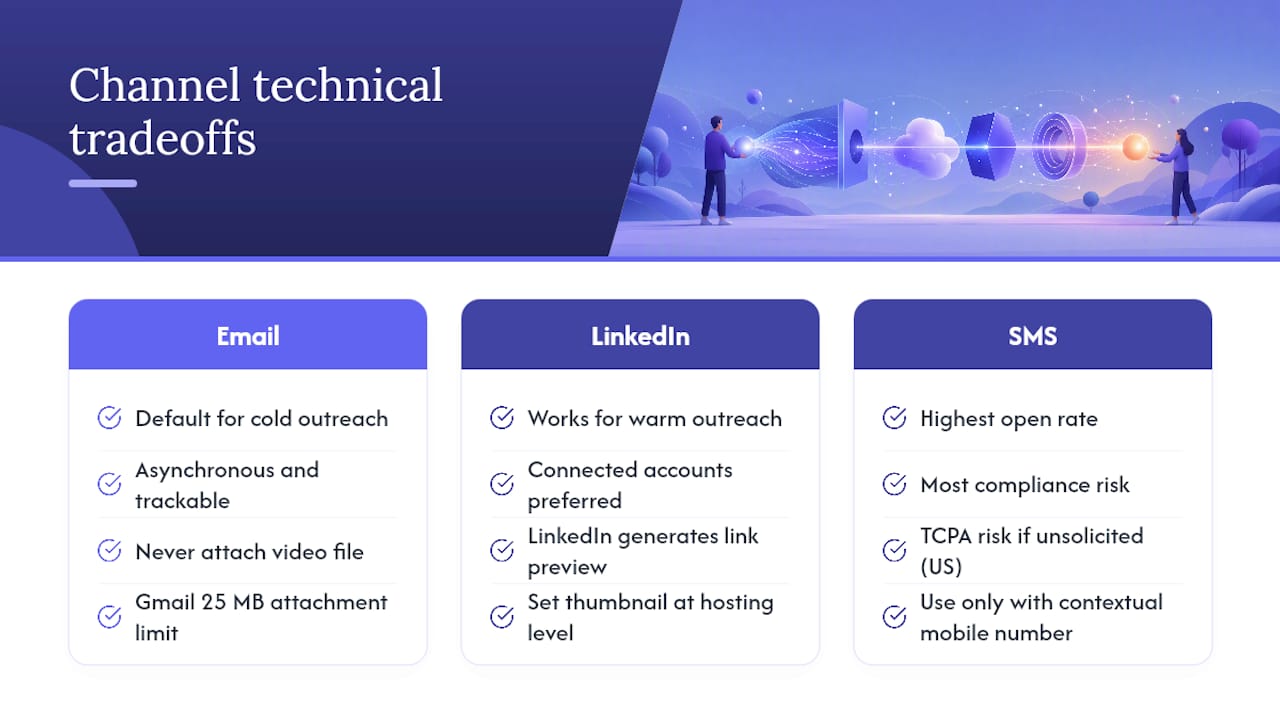
Email is the default for cold outreach. It’s asynchronous, trackable, and works with any video hosting platform. The technical rule is simple: never attach the video file. Gmail’s 25 MB attachment limit means even a short 1080p clip can trigger an automatic Drive conversion, which strips your custom thumbnail and breaks your tracking. Always send a hosted link.
LinkedIn works well for warm outreach and for accounts where you’ve already connected. The preview behavior is different from email: LinkedIn generates its own link preview, so your thumbnail needs to be set at the hosting level, not just in the email body. Native LinkedIn video DMs are an option for first-degree connections, but they don’t give you view analytics. A hosted link with a custom thumbnail is almost always the better technical choice.
SMS has the highest open rate of any channel, but it carries the most compliance risk. In the US, sending unsolicited commercial SMS to a prospect who hasn’t opted in can trigger Telephone Consumer Protection Act (TCPA) issues. Use SMS only when a prospect has given you their mobile number in context, and keep the message short with a clear opt-out path.
Statistic callout: WeTransfer’s resources note that professional video sharing platforms let recipients watch in the browser without downloading, and provide engagement tracking useful for sales outreach — two features that email attachments and basic cloud links simply don’t offer.
Send method comparison:
For files over 10 GB (raw 4K recordings, for example), dedicated transfer services with resumable uploads prevent failed restarts on slow connections. For prospecting, you’ll rarely need this, but it matters when sharing raw demo recordings with a production team.
What hosting and tracking features do you actually need?
The hosting platform is where most sales teams underinvest. They record a great video, drop it in Google Drive, and send a link that gives them zero signal on whether anyone watched. That’s a wasted send.
Professional video sharing platforms let recipients watch in the browser without downloading and provide the engagement data that makes follow-up intelligent rather than guesswork. The minimum feature set for sales video hosting:
- Browser playback without download: a prospect who has to download a file before watching will not watch
- Custom thumbnail control: you need to set the frame that appears before play, not leave it to the platform’s auto-grab
- Per-recipient tracking: who played it, when, and how far they watched
- Secure, expirable links: especially relevant for enterprise prospects with security-conscious IT teams
- CRM or sequence integration: so view events trigger follow-up tasks automatically
Dedicated video transfer platforms with resumable uploads and streaming preview are the right choice for collaborative review workflows, where a prospect’s team needs to leave frame-accurate feedback on a demo recording. Secure share links that let recipients watch in the browser and leave comments turn a chaotic email thread into an organized approval workflow — useful when you’re working through a buying committee that needs to align on a demo before moving forward.
Tracking checklist for every prospecting send:
- View timestamp (when did they first play?)
- Watch depth (did they make it to the CTA?)
- Replay count (replays signal high interest)
- Click-through on the CTA link
- Per-stakeholder breakdown when multiple people share the link
WeTransfer’s free tier supports transfers up to a few gigabytes with no re-encoding, which makes it a solid option for one-off large file sends where tracking isn’t required. For recurring prospecting sends where you need analytics, a sales-focused video host is the right tool.
How do you scale personalized video without recording 200 individual clips?
The honest answer: you can’t fully automate the personal signal, but you can get close enough that the economics work.
When to record one-off personal videos: key accounts, champions who need to re-sell internally, complex technical demos, and any situation where the prospect has given you specific context that deserves a specific response. The effort is justified when the deal size or strategic value is high.
When to use an AI personalization workflow: once you’re sending more than 15–20 videos per week, the math shifts. The workflow looks like this:
- Record one master video (your core message, 45–60 seconds)
- Generate dynamic intros that swap in the prospect’s name and company (AI voice cloning handles this)
- Set a dynamic thumbnail with the prospect’s name or company logo
- Push the personalized link into your CRM sequence automatically
AI-personalized video workflows let teams record a master video and generate individualized versions with name, company, and dynamic background, reducing per-contact time from minutes to seconds. Vendors in this space report meaningful reply-rate uplifts compared to generic video sends.
Pro Tip: Before you ship AI-personalized videos at scale, spot-check 10 outputs manually. Unusual names, hyphenated surnames, and non-English company names are where voice-clone mispronunciations cluster. Fix the edge cases before they reach a prospect.
Measuring the ROI of AI personalization: track cost-per-send (time saved per video multiplied by your hourly rate) against reply-rate lift. If AI personalization cuts your per-send time from 8 minutes to 45 seconds and lifts reply rate by even a few percentage points on a 100-contact list, the math is straightforward.
What metrics should you track, and what does a good follow-up cadence look like?
Primary metrics to watch:
- Open rate: did the email get opened? (subject line and sender name are the levers)
- Play rate: of everyone who opened, what percentage clicked play? (thumbnail and subject line are the levers)
- Watch-to-completion: did they watch past the CTA? (script and length are the levers)
- Reply rate: the metric that actually matters for pipeline
- Meeting conversion rate: replies that turned into booked calls
- Downstream pipeline value: the number that justifies the program to your CRO
Secondary metrics for script optimization:
- Time-to-first-play (fast plays signal high intent; plays 48 hours later signal lower urgency)
- Drop-off point (if most viewers stop at 30 seconds, your proof point isn’t landing)
- Replay count by stakeholder (a CFO who replays the pricing section three times is a buying signal)
A/B tests worth running first:
- Subject line A (curiosity) vs. subject line B (specificity)
- Thumbnail with name text vs. thumbnail with company screenshot
- 45-second video vs. 75-second video
- “Does Thursday work?” CTA vs. “Reply yes for the one-pager” CTA
Example 7-touch cadence with two video touches:
- Day 1: Personalized video email (Touch 1 — video)
- Day 3: LinkedIn connection request with a short note referencing the video
- Day 5: Follow-up email (text only, references the video)
- Day 8: Second short video (Touch 2 — video follow-up, 30–40 seconds)
- Day 11: LinkedIn message with a relevant piece of content
- Day 14: Final email (“Should I close this out?”)
- Day 17: Breakup email or phone call
Target KPIs for this cadence: 30–40% open rate on video emails, 20–30% play rate, and a reply rate meaningfully above what your text-only sequences produce.
Common mistakes, privacy notes, and a quick best-practices checklist
The mistakes that kill video prospecting programs:
- Sending the file as an attachment. It breaks tracking, hits size limits, and looks unprofessional.
- No thumbnail personalization. A generic play button thumbnail gets the same click rate as a plain text email.
- Multiple CTAs in one video. “Book a call, check out our website, or reply with questions” is three asks. Pick one.
- Sending the same master video to 500 contacts without any personalization signal. This is spam with production value.
- Recording in a noisy environment. Bad audio kills credibility faster than bad lighting.
Privacy and compliance notes for US B2B outreach:
- Email prospecting to business addresses is generally permissible under CAN-SPAM as long as you include a physical address and a clear opt-out mechanism.
- SMS to prospects who haven’t explicitly opted in carries TCPA risk. Don’t send unsolicited commercial texts to mobile numbers.
- Don’t claim to have accessed or analyzed a prospect’s private data. “I noticed your public job postings” is fine. “I analyzed your internal sales data” is not.
- If you’re using AI voice cloning for personalized intros, disclose this in your privacy policy and don’t use it to impersonate someone else.
One-page checklist for your playbook:
- [ ] Video is 45–75 seconds (cold) or 30–40 seconds (follow-up)
- [ ] Prospect’s name or company visible in the thumbnail
- [ ] First sentence says their name and one specific observation
- [ ] One proof point in the middle
- [ ] One CTA at the close
- [ ] Sent as a tracked hosted link, not an attachment
- [ ] Tracking enabled: play rate, watch depth, CTA click
- [ ] Follow-up task set in CRM triggered by view event
How does Trailercast fit into the send-video-to-prospects workflow?
Most sales teams running video prospecting are stitching together four or five separate tools: a recorder, a video host, a tracking dashboard, a deal room, and an eSignature tool. Trailercast replaces all of them.
Here’s how the Trailercast feature set maps to the workflow covered in this article:
- Browser recording: record a prospecting video or demo directly in the browser, no install required, and it’s immediately ready to send
- AI-edited demo trailers: the AI picks the 8–15 minutes that mattered from a demo recording and stitches them into a branded trailer, personalized per stakeholder (a CFO version focused on pricing, a CISO version focused on security)
- Tracked async video sends: every send gets a tracked link with per-recipient play analytics, watch depth, and replay counts
- Decision rooms: a buyer-facing workspace where the video, mutual action plan, ROI summary, and documents live in one place, with a live engagement panel showing per-stakeholder activity
- Embedded eSignature: close the deal in the same workspace without a DocuSign hop
- AI call intelligence: every discovery call and demo is transcribed, summarized, and fed into an evolving Deal Brief that informs the next video you send
The tracking and engagement data feeds directly into follow-up cadence decisions. When a prospect replays the pricing section of your demo trailer three times, Trailercast surfaces that signal so you can follow up with the right message at the right moment, rather than sending a generic “just checking in” email.
One-week pilot plan: take 10 active opportunities, add one async video follow-up touch after each demo using Trailercast’s AI trailer feature, and measure play rate and reply rate against your baseline. That’s enough signal to decide whether to roll it out to the full team.
A rapid test you can run this week
Here’s the honest truth about video prospecting: most reps overthink the production and underthink the targeting. The test that gives you real signal is simpler than you expect.
Pick 25 warm prospects from your current pipeline or a recent list of no-replies. Record one master video, 60 seconds, following the four-beat structure above. For the top five accounts on that list, record a personalized 10-second intro that names the company and one specific observation, then splice it onto the master. For the remaining 20, send the master video with a personalized thumbnail.
Send all 25 via tracked hosted links on a Tuesday or Wednesday morning. Check your analytics at 24, 48, and 72 hours. You’re looking for three signals: who played it, how far they watched, and whether the personalized-intro group outperformed the thumbnail-only group on reply rate.
The point of this test isn’t to prove video works in general. You already know it does. The point is to measure your personalization lift with your audience so you can make a data-backed case for scaling the program. If the five personalized-intro videos produce a meaningfully higher reply rate than the 20 thumbnail-only sends, you have your answer on where to invest the extra recording time.
Don’t wait for a perfect setup. A decent ring light, a clean background, and a specific observation about each prospect’s business will outperform a polished generic video every time.
Trailercast consolidates the entire video prospecting stack
Five-tool stacks break. A recorder here, a hosting platform there, a deal room somewhere else, and a tracking dashboard that doesn’t talk to any of them. The deal loses coherence every time a prospect moves between those disconnected surfaces.

Trailercast is built for exactly the workflow this article describes: record in the browser, let the AI edit the demo into a stakeholder-specific trailer, send it via a tracked link, and move the whole conversation into a buyer-facing decision room where every stakeholder’s engagement is visible in real time. One workspace, from first video send to signed contract.
The pricing is straightforward: $79/seat/month, or $59/seat/month billed annually, with every feature included and no gating. The first 100 paid teams lock in 20% off for the life of the account. No credit card required to start.
If you’re running a multi-stakeholder deal cycle and you’re tired of losing deals in the space between conversations, Trailercast and run the one-week pilot described above. The metrics will tell you the rest.
Sources
These are the resources worth bookmarking if you want to go deeper on any part of the workflow covered above.
- Share files with clients - WeTransfer resources
- How to send your video in Kreatli | Kreatli
- Video in sales — HubSpot Sales Blog
- Video Prospecting for Sales: How to Use Video to Book More Meetings | Vidyard