IT and RevOps: 6 Step Admin Checklist for SAML SSO in Sales Tools

Yes, SAML based SSO is the standard way to secure and govern enterprise sales tools, and you should treat it as the default, not a nice-to-have add-on. The immediate first step is boring but critical: pick your identity provider and collect the Entity ID, ACS URL, and SP metadata from your sales tool before you touch any configuration screen. Get that right, and the rest of the rollout, from attribute mapping to provisioning gets a lot easier.
TL;DR:
- Most enterprise sales platforms support SAML 2.0, and using the company’s existing identity provider simplifies configuration and management.
- Proper setup requires collecting correct Entity ID, ACS URL, and metadata from the sales tool before initiating configuration.
- Combining multiple sales tools into a single consolidated workspace reduces complexity, maintenance, and governance overhead.
- Pairing SAML with SCIM provisioning automates user lifecycle management, preventing orphaned accounts and enhancing security.
- Regular audits of group-to-role mappings and deprovisioning workflows are essential to maintain effective access governance after rollout.
Table of Contents
- Why SAML SSO Matters for Sales Enablement and Revenue Teams
- Which Identity Providers and Login Flows Do Sales Tools Support?
- Setting Up SAML SSO for a Sales Tool: The Admin Checklist
- Provisioning and Role Mapping: SCIM, JIT, and Avoiding Orphaned Accounts
- Troubleshooting SAML: The Errors You’ll Hit and How to Fix Them
- How SAML SSO Supports Governance Across Your Sales Stack
- Where a Consolidated AI Sales Workspace Fits Into Your SSO Plan
- Your SAML SSO Pilot: Timeline and Who to Involve
- The Part of SSO Rollouts Everyone Underestimates
- Get Trailercast Running Under One SSO Connection
- Sources
Why SAML SSO Matters for Sales Enablement and Revenue Teams
Sales tools hold some of the most sensitive data in the company: pricing, contract terms, buyer intent, recorded calls, signed documents. Yet they’re also the tools reps demand fast access to, so IT teams often end up granting local logins just to keep deals moving. That tradeoff is exactly what SAML SSO removes.
Centralized identity through your identity provider (IdP) shuts down the credential sprawl that happens when every rep has a separate password for the CRM, the conversation intelligence tool, and the demo platform. It also lets you enforce multi-factor authentication and conditional access policies from one place instead of hoping each vendor’s own MFA settings are configured correctly.
Auditors care about this too. Lack of centralized identity on sales systems is one of the more common findings during ISO 27001 and similar compliance reviews, because separate local credentials on a revenue tool are treated as an unmanaged access gap. SSO is increasingly the baseline auditors expect, not the exception they praise.
On the operational side, the benefits show up fast:
- Reps log in once and reach deal rooms, demo trailers, and call transcripts without a second password.
- IT revokes access instantly at the identity layer instead of chasing individual app admin consoles.
- Security teams get one authentication log instead of five scattered ones.
Pro Tip: Frame the SSO rollout to sales leadership as a speed improvement, not just a security requirement. Reps care about fewer logins far more than they care about compliance language.
Which Identity Providers and Login Flows Do Sales Tools Support?
Most enterprise sales platforms are built on SAML 2.0, which means they work with whatever identity provider your company already runs. The IdPs showing up most often in sales tech stacks are Okta, Microsoft Entra ID, Google Workspace, OneLogin, and PingIdentity, and nearly every modern sales tool supports at least the first three natively.
You’ll also need to decide which login flow your teams will use, since sales tools typically support both:
- SP-initiated flow: the rep starts at the sales tool, clicks “log in with SSO,” and gets redirected to the IdP to authenticate before bouncing back.
- IdP-initiated flow: the rep starts at their IdP dashboard (an Okta tile, for example) and launches directly into the tool without visiting its login page first.
Both flows depend on the same underlying handshake: an exchange of metadata between the service provider (the sales tool) and the identity provider. That exchange includes the Entity ID, the Assertion Consumer Service (ACS) URL, and a signing certificate. Configuration usually means uploading an XML metadata file or manually entering these values, and changes typically take effect once the connection has been tested and confirmed.
If your reps are used to clicking into tools from an Okta or Entra dashboard, prioritize testing IdP-initiated flow first. If they’re more likely to bookmark the tool directly, test SP-initiated first.
Setting Up SAML SSO for a Sales Tool: The Admin Checklist
Configuring SAML is not complicated once you know the order of operations. Most failures happen because a step gets skipped, not because the protocol itself is hard.
- Pull the SP metadata from your sales tool. Every tool that supports SAML will expose an Entity ID and an ACS URL, either as a metadata XML file or as a metadata URL you can hand to your IdP. Decide up front which format your IdP prefers; some accept a URL and auto-refresh, others need a static file.
- Create the SAML application inside your IdP. In Okta or Entra ID, this means creating a new enterprise application and uploading the SP metadata you just pulled.
- Bring the IdP metadata back into the sales tool. This usually means uploading the IdP’s signing certificate or pasting its metadata URL into the tool’s SSO settings page, following patterns similar to what you’ll find in vendor SAML configuration docs across the sales tech category.
- Configure NameID and attribute mapping. Decide whether the tool matches users by email or a separate Federation ID, then map first name, last name, and email attributes explicitly. This is also where you decide between Just-in-Time (JIT) provisioning, where accounts get created automatically on first login, or pre-provisioning, where accounts already exist and SSO only handles authentication.
- Map IdP groups to product roles. If your IdP has an “AE Team” or “Sales Managers” group, map that group to the correct role inside the sales tool so permissions apply automatically rather than through manual assignment.
- Test with a small staging group before rollout. Run both SP-initiated and IdP-initiated logins, confirm the right attributes arrive, and check that JIT-provisioned accounts land with the correct role. Only after this passes should you disable local password logins organization-wide.
Pro Tip: Never disable local passwords the same day you flip on SSO. Keep them active for 48 to 72 hours as a rollback path in case attribute mapping needs a second pass.
Provisioning and Role Mapping: SCIM, JIT, and Avoiding Orphaned Accounts
SAML handles authentication, proving who someone is, but it doesn’t handle the full lifecycle of an account. That’s where provisioning strategy matters, and getting it wrong is how companies end up with dozens of “ghost” accounts still active months after someone left the sales team.
Just-in-Time (JIT) provisioning creates a user account automatically the first time someone logs in through SSO. It’s simple to set up and works well for smaller teams, but it only handles account creation. It does nothing when someone leaves the company, which means deprovisioning still has to happen manually inside the sales tool itself.
SCIM provisioning goes further. Paired with SAML, SCIM automates the full lifecycle, creating, updating, and deactivating accounts as changes happen in your IdP’s directory. When someone is offboarded in Okta or Entra ID, SCIM pushes that deactivation into the sales tool within minutes instead of waiting for an admin to remember.
- Use JIT alone for smaller sales teams with low turnover and a manual offboarding checklist that’s actually followed.
- Use SCIM once your sales org passes roughly 50 to 100 seats, or once you have multiple sales tools that each need synchronized access.
- Always map IdP security groups to product roles rather than assigning roles manually per user, since manual assignment is the most common source of over-provisioned access.
Pro Tip: Run a quarterly audit comparing your IdP’s active user list against each sales tool’s active user list. Any account active in the tool but missing from the IdP is an orphaned account that should be deactivated immediately.
Troubleshooting SAML: The Errors You’ll Hit and How to Fix Them
Most SAML failures trace back to one of three things: a metadata mismatch, an attribute mapping error, or an expired certificate. Knowing which one you’re looking at saves hours of guesswork.
- ACS URL or Entity ID mismatch. Even a trailing slash difference between what’s configured in the IdP and what the sales tool expects will cause authentication to fail silently or bounce back to a login loop. Copy these values directly rather than retyping them.
- NameID or Federation ID mismatch. If the tool expects to match users by email but the IdP is sending a different identifier, you’ll see “no user found” errors even though authentication technically succeeded. Verify attribute delivery explicitly rather than trusting a “test successful” message alone, since some IdPs report success even when the expected attributes never arrived.
- Certificate expiry. SAML signing certificates typically expire on a set schedule; missing a renewal breaks login for everyone at once, usually without much warning.
- Redirect loops. These often show up in tools that rely on a custom domain setup (Salesforce’s My Domain being the classic example), where a misconfigured ProfileId lets authentication succeed but provisioning fail behind the scenes.
A SAML tracer browser extension paired with your IdP’s sign in logs will surface almost every one of these issues within minutes. If you want to test flows in a sandbox before touching production, a tool like Buildside’s beta testing environment is useful for validating SP and IdP-initiated logins without risking a live outage.
How SAML SSO Supports Governance Across Your Sales Stack
Security and compliance teams don’t just want SSO turned on. They want evidence it’s enforced consistently, and that’s where SAML earns its place in an audit binder rather than just an IT ticket.
Centralizing authentication through your IdP means multi-factor authentication and conditional access policies apply the same way across every sales tool, instead of depending on each vendor’s own MFA settings being configured correctly and separately. Pair that with SCIM provisioning, and deprovisioning becomes consistent too. That combination is exactly what closes the access-governance gaps auditors flag most often.
- Enable and retain authentication event logs in your IdP, not just inside each individual sales tool.
- Document your deprovisioning workflow in writing, including how quickly access is revoked after an offboarding event.
- Review group-to-role mappings periodically so permissions don’t quietly drift as teams reorganize.
If your compliance team needs help formalizing evidence collection around these controls, a managed compliance operations partner can help translate SSO configuration into audit-ready documentation. Also worth reviewing directly: TrailerCast’s own security posture, which lays out how identity and access controls apply across its workspace.
Where a Consolidated AI Sales Workspace Fits Into Your SSO Plan
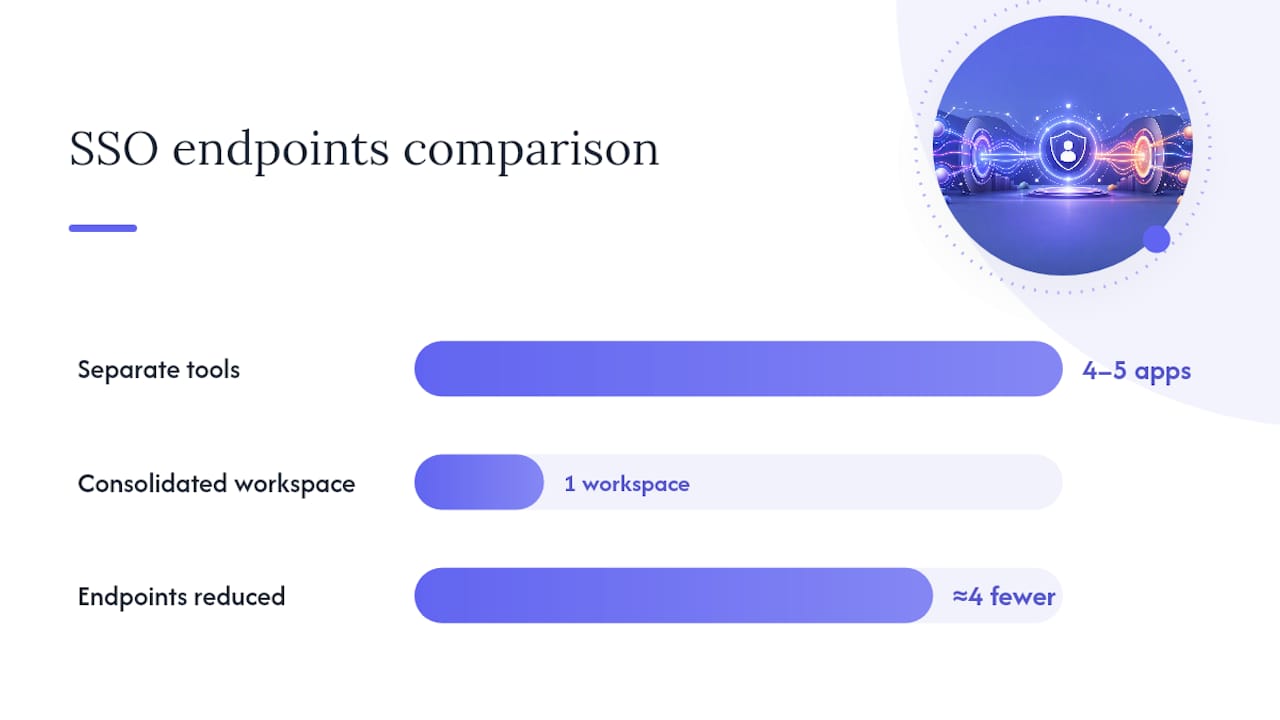
Every additional sales tool is another SAML application to configure, another set of attribute mappings to maintain, and another endpoint your security team has to audit. That math adds up fast once you count conversation intelligence, video tools, deal rooms, and eSignature as four or five separate SSO connections instead of one.
Trailercast approaches this differently by running the full deal lifecycle inside one workspace: calls, AI-edited demo trailers, buyer-facing deal rooms, eSignature, and post-close handoff all live under a single login rather than five.
- Fewer SP endpoints means fewer Entity IDs and ACS URLs for your IT team to track and rotate certificates on.
- One workspace means one place to verify attribute mapping and JIT provisioning worked correctly, rather than five.
- Consolidation narrows your audit surface, since a smaller number of connected applications is inherently easier to review than a sprawling point-solution stack.
Confirm your exact IdP compatibility and attribute requirements against current product documentation before rollout, since enterprise SSO add-ons are typically configured through a direct implementation conversation.
Your SAML SSO Pilot: Timeline and Who to Involve
Don’t attempt an org-wide SSO cutover on day one. Run a scoped pilot first: pick 10 to 20 users across a few roles, confirm attribute mapping and provisioning behave correctly, and only expand once that group passes cleanly.
- Involve IT or identity admin to own the IdP-side configuration.
- Involve RevOps or sales ops to validate that role mappings match how sales teams are actually structured.
- Involve security to confirm MFA and conditional access policies apply correctly through the new SSO connection.
- Include a small sales pilot group to catch real-world login friction before a full rollout.
The Part of SSO Rollouts Everyone Underestimates
Most SSO advice treats the protocol handshake as the hard part. It isn’t. The metadata exchange, the certificate upload, the attribute mapping, all of that is mechanical and well documented. What actually derails rollouts is governance discipline after launch: nobody owns the quarterly review of group-to-role mappings, nobody checks whether SCIM deprovisioning is actually firing on schedule, and six months later there’s a pile of stale accounts nobody remembers granting.
The conventional advice focuses almost entirely on getting login working. That’s necessary but insufficient. The teams that get real value from SAML SSO treat it as a lifecycle system, not a login screen, which means someone is explicitly responsible for auditing access on a recurring schedule.
If you’re planning a rollout across a fragmented sales stack, prioritize consolidation before you prioritize configuration elegance. Every tool you remove from the stack is one less SAML application, one less certificate to renew, and one less place for an orphaned account to hide. The math on governance overhead scales with tool count, not with how well any single integration is configured.
— Daniel
Get Trailercast Running Under One SSO Connection
Instead of configuring SAML separately for a conversation intelligence tool, a video platform, a deal room, and an eSignature vendor, Trailercast gives your IT team one workspace to secure, one Entity ID to manage, and one audit trail to review, covering everything from the first discovery call to the signed contract.
An image illustrating the value of consolidating sales tools under one SSO connection.
That matters most for sales operations and IT teams juggling enterprise governance requirements across a growing GTM stack. Fewer SP endpoints means fewer places for attribute mapping to break, fewer certificates expiring on different schedules, and a much shorter list when your security team asks what’s connected to your identity provider. Enterprise add-ons including SSO and SAML sit on top of the platform’s standard plans through a direct implementation conversation.
If your sales team is currently juggling separate logins for call recordings, demo trailers, and a buyer-facing deal room, start by reviewing Trailercast’s features across the deal lifecycle and requesting a walkthrough of how SSO fits into your specific IdP setup.