Interactive Product Tour for B2B SaaS Sales Teams

The fastest way to build an interactive product tour today is to record a real product flow, let AI auto-generate the steps, personalize by stakeholder, and embed it directly into your CRM or deal room. No engineering required. No week-long production cycle. Trailercast does exactly this at $79/seat/month (or $59 billed annually), with a free trial and no feature gating.
Here’s what that looks like in practice:
- Record a live product flow using a browser recorder or lightweight extension.
- Auto-generate steps and annotations with AI (hotspots, branching, copy).
- Edit for persona: crop sensitive data, add voiceover, adjust the narrative.
- Personalize per stakeholder: a CFO path that leads with pricing, a CISO path that leads with security.
- Embed via snippet or shareable link into your CRM record, decision room, or follow-up email.
Stat: Short, focused tours aimed at a single “aha moment” consistently outperform longer walkthroughs on completion rate.
Table of Contents
- How do you build an interactive product tour in five steps?
- What design rules keep tours engaging and low-maintenance?
- Where in the sales lifecycle do tours actually move deals?
- Where should you embed tours and what should you track?
- Which KPIs should you set and how do you run quick experiments?
- How does Trailercast implement interactive product tours end-to-end?
- Key Takeaways
- Why most sales teams underestimate the space between demos
- Your first interactive product tour, built this week
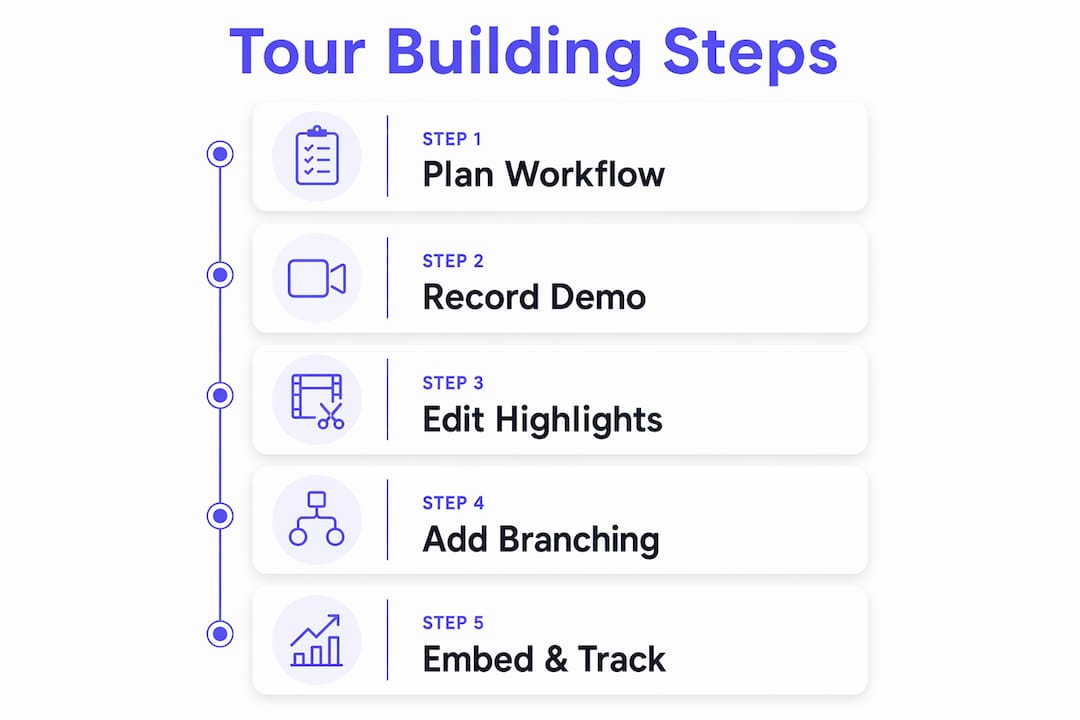
How do you build an interactive product tour in five steps?
The whole workflow can run in under an hour once you have a recorded demo. Here’s the repeatable sequence.
-
Record the product flow. Use a browser recorder or a lightweight Chrome extension to capture clicks and inputs in real time. No screen-share software, no engineering involvement. The recording becomes your raw material.
-
Let AI generate the steps. Upload or sync the recording and let the AI auto-generate tour steps with annotations and hotspots. This is the part that used to take a full day of manual work. Now it takes minutes.
-
Edit copy and add voiceover. Rewrite any step that sounds generic. Crop or blur sensitive customer data. Add a cloned-voice narration if the platform supports it. This is where the tour stops feeling like a template and starts feeling like your product.
-
Personalize per stakeholder. Don’t build one tour and hope it lands. Branch by persona: the economic buyer gets the ROI path, the technical evaluator gets the security and integration path. Your champion then has something worth forwarding to the people who weren’t on the call.
-
Publish and embed. Drop a JavaScript snippet or iframe into your website, CRM record, or decision room. Enable tracking before you share. A tour nobody can measure is a tour you can’t improve.
Pro Tip: Record the tour from a demo environment that mirrors your prospect’s industry. A fintech buyer who sees a banking dashboard immediately feels more understood than one who sees a generic SaaS UI.
What design rules keep tours engaging and low-maintenance?
Getting the workflow right is half the battle. The other half is keeping tours short enough to finish and stable enough to survive your next frontend release.
| Design Rule | Why It Matters | How to Apply It |
|---|---|---|
| Five steps or fewer | Longer tours see sharply lower completion rates | Cut to the single strongest “aha moment” per persona path |
| One CTA per path | Multiple CTAs split attention and reduce conversion | Pick one next step: book a call, start a trial, or review the proposal |
| Stable CSS selectors | SPA route changes break fragile DOM anchors | Use attribute-based anchoring or a builder that automates selector stability |
| Weekly update cadence | Frequently updated tours correlate with higher conversion impact | Assign one owner; schedule a 15-minute sprint review each week |
| Real click-throughs, not video | Interactive flows drive higher engagement than passive recordings | Use a builder that captures DOM snapshots or live click-through flows |

The most common mistake is building a product buying guide that covers everything. A 20-step walkthrough is a product manual, not a tour. Pick the moment where the buyer’s eyes light up and build backward from there.
Pro Tip: Branch by role instead of duplicating whole tours. One base recording, two or three persona paths branching from step two, saves you from maintaining three separate assets every time the UI changes.
Where in the sales lifecycle do tours actually move deals?
A guided product walkthrough isn’t just an onboarding tool. Used at the right moment, it replaces a live call, re-engages a stalled deal, or answers the question a CISO asked three weeks after your demo.
- Prospecting: A short, personalized teaser tour replaces a 45-minute intro call for buyers who want to self-qualify. Send it before the first meeting, not after.
- Demo follow-up: Role-specific AI-edited trailers surface the buyer’s key moments and include a clear next step. Your champion can forward a CFO-specific path without scheduling another call.
- Re-engagement: Inactive accounts respond to targeted tours that highlight a new feature or a workflow they haven’t seen. Product tours are lifecycle tools that work well beyond initial onboarding.
- Support deflection: Repetitive “how do I do X” questions can be answered with a contextual walkthrough embedded in your help center or decision room, reducing CS load.
- Deal-room enablement: Embed the tour directly in the buyer’s decision room so every stakeholder, including the ones who never attended a live demo, can experience the product on their own schedule.
The deal doesn’t die on the call. It dies in the internal meeting you weren’t part of. A role-specific digital product demo gives your champion the right asset to run that meeting without you.
Where should you embed tours and what should you track?
Distribution is where most teams leave value on the table. They build a great tour and then paste a link into one email. Here’s a more complete playbook.
Primary distribution channels:
- Website product pages and landing pages (always-on, no gating for top-of-funnel)
- Email follow-ups (personalized link per prospect, tracked opens and plays)
- CRM records (attach to the opportunity so the whole team sees engagement)
- Decision rooms (embedded per deal, per stakeholder)
- Help center (self-service deflection for post-sale questions)
| Embed Method | Best For | Trade-off |
|---|---|---|
| JavaScript snippet | Website and in-app, full interactivity | Requires one-time code placement |
| iFrame | Landing pages, email-linked microsites | Slightly limited cross-origin tracking |
| Shareable link | CRM, email, Slack, decision rooms | Easiest to deploy; tracking depends on platform |
What to track at minimum: view rate, step completion rate, drop-off by step, viewer identity (when available), referral source, and CTA click-through. Tools that integrate with HubSpot or Salesforce can tie tour views directly to open opportunities, which is where the attribution story gets compelling for your CRO.
Which KPIs should you set and how do you run quick experiments?
Metrics without targets are just noise. Set these before you launch.
- View rate: Are people actually opening the tour? A low view rate is a distribution problem, not a content problem.
- Step completion rate: Target above 40% for a five-step tour. Drop-off at step two usually means the hook isn’t landing.
- CTA click-through rate: This is the conversion metric. An 8–12% lift in demo-to-opportunity conversion is a reasonable target for tours used in follow-ups.
- Share rate: How often does your champion forward the tour to another stakeholder? High share rate is the strongest signal of champion engagement.
- Time-to-close impact: Teams that embed tours in deal rooms and follow-ups typically target a 10–15% reduction in time-to-close. Track it per cohort, not across all deals.
Experiment framework: Test one variable at a time per sales segment. Start with CTA placement (step three vs. final step), then test persona pathing (one path vs. two branched paths), then test tour length (three steps vs. five). Run each test for at least two weeks before drawing conclusions.
Reporting cadence: Weekly step-level analytics during rollout. Monthly pipeline impact review once you have enough volume to see trends.
How does Trailercast implement interactive product tours end-to-end?
Trailercast maps the entire workflow into a single workspace. Here’s how the features line up.
| Workflow Stage | Trailercast Feature |
|---|---|
| Record product flow | Browser recording, no install required |
| AI step generation | Claude Fable 5 moment-detection; auto-edited trailer from recording |
| Edit and voiceover | Branded trailer with cloned voice narration, 15+ languages |
| Persona branching | Per-stakeholder trailer paths (CFO, CISO, champion) |
| Embed in deal room | Decision rooms with per-stakeholder engagement tracking |
| CRM and attribution | Native CRM sync (enterprise); shareable links with engagement heatmap |
| eSignature and close | Embedded eSignature, no third-party hop |
| Post-close handoff | AI Handoff Brief auto-fires to Customer Success on contract sign |
What’s included at every seat:
- Conversation intelligence (Zoom, Meet, Teams) with searchable transcripts
- AI-edited demo trailers and decision rooms
- Winter, the in-app AI assistant that reads live call transcripts
- Engagement heatmap and per-stakeholder activity panel
- Embedded eSignature and AI QBR briefs
Pricing is transparent: $79/seat/month, or $59/seat/month billed annually. Every feature is included at that price. Enterprise add-ons (SSO/SAML, white-label, own-domain sending, native CRM sync) are available via custom contract. The first 100 paid teams lock in a 20% lifetime discount. There’s a free trial with no credit card required.
Key Takeaways
The most effective interactive product tour is short, personalized by stakeholder, embedded where buyers already spend time, and updated weekly to stay accurate.
| Point | Details |
|---|---|
| Keep tours to five steps | Aim for one “aha moment” per persona path; longer tours see lower completion rates. |
| Personalize by role, not by deal | Branch CFO, CISO, and champion paths from one base recording to reduce maintenance. |
| Track step completions first | A completion rate above 40% signals the tour is landing; below that, fix the hook. |
| Embed in decision rooms | Tours placed in buyer-facing rooms give stakeholders who missed the live demo a way to self-qualify. |
| Trailercast consolidates the stack | At $79/seat/month with no feature gating, it replaces five separate tools across the full deal lifecycle. |
Why most sales teams underestimate the space between demos
The conventional wisdom is that a better demo closes more deals. That’s only partially true. The demo gets you to the next meeting. What closes the deal is what happens in the three weeks after, when your champion is re-selling your product internally to people you’ve never met.
An interactive tour built for that space, one that a CFO can watch in six minutes and a CISO can forward to their security team, is a fundamentally different asset than a recording of your live call. It’s edited, branded, and built around the question that stakeholder actually has. That’s not a nice feature. It’s the difference between a champion who can advocate for you and one who’s stuck with a PDF.
The teams that treat tours as living documents, updated weekly as the product evolves, are the ones that see compounding returns. A tour that’s six months out of date is worse than no tour. But a tour that’s accurate, short, and role-specific is something your champion will use without being asked.
Start small. Pick one persona, one “aha moment,” and one deal stage. Measure step completions for two weeks. Then expand.
Your first interactive product tour, built this week
Trailercast gives B2B SaaS sales teams a concrete advantage in the space between calls: AI-edited demo trailers that are personalized per stakeholder, embedded in buyer-facing decision rooms, and tracked at the individual level. You get conversation intelligence, demo editing, deal rooms, eSignature, and post-close handoff in one workspace at $79/seat/month with every feature included.

The free trial takes under five minutes to start. Record a meeting or a browser demo, let the AI generate a trailer, and embed it into a decision room before your next follow-up. No credit card, no engineering, no long procurement cycle. The full platform is available at trailercast.io, and the feature breakdown shows exactly how each stage of the deal lifecycle maps to a specific capability. Start the trial, build one tour for one persona, and measure what happens to your follow-up response rate.