Mutual Action Plan Template for B2B Sales: SMB to Enterprise (3–15 rows)

A free, editable mutual action plan template is available in Google Sheets and Excel, and the first move is always the same: write the buyer’s outcome in their own words on the goal line, then work every milestone date backward from it. Gartner’s 2025 sales survey found a high rate of unhealthy conflict inside B2B buying committees during decision-making, which is exactly what a shared, dated plan is built to prevent. Copy the sheet, fill the goal line first, and everything else follows.
TL;DR:
- A mutual action plan should focus on buyer outcomes in their own language, with milestone dates reverse-engineered from the goal to prevent internal conflict.
- Templates should include a goal line, stakeholder list, milestone rows, and a status field, with customization based on deal complexity and stage.
- Regular review and updating of the plan are critical, with clear status indicators and owner accountability to maintain deal momentum.
- Using a deal workspace or deal room helps keep the plan visible, editable, and tied to engagement analytics, reducing slowness and stagnation.
- A well-built MAP emphasizes buyer ownership, flags early risks, and adapts to the deal’s cycle length to stay practical and effective.
Table of Contents
- Downloadable MAP Templates: What’s in Each File and Which to Choose
- Best Practices for Building a Buyer-Centric MAP
- Templates by Deal Type: Copy-Paste MAP Shapes for SMB, Mid-Market, and Enterprise
- Running the MAP Day to Day: Cadence, Status, and CRM Rules
- TrailerCast’s Perspective: Making MAPs Live in a Single Deal Workspace
- TrailerCast: For Teams That Want a Living MAP, Not a Buried Spreadsheet
- Selected Downloads and Recommended Reading
- Sources
Downloadable MAP Templates: What’s in Each File and Which to Choose
A usable mutual action plan template needs the same skeleton whether it lives in a spreadsheet or a deal room: a goal line, a stakeholder list, a set of milestone rows, and a status field that tells you the health of the deal at a glance. DealCollab’s free Google Sheets version includes a filled example alongside the blank template, which matters more than it sounds. Seeing nine rows populated with real dates and real names teaches you the format faster than any instructions could.
Here’s what a well-built file actually contains:
- Goal line — the buyer’s outcome, in their words, with a target date
- Stakeholders list — every person touching the deal, buyer and seller side
- Milestone rows — 6 to 12 line items, never micro-tasks
- Owner column — a named person plus their role, not a department
- Due date — reverse-engineered from the goal line, not the sales cycle
- Status dropdown — on track, at risk, overdue, or done
- Biggest risk row — the one thing most likely to blow the timeline
- Filled example — a second tab showing the template in use
Which format fits depends on how the deal is running. Google Sheets works best when you’re co-editing live with the buyer on a screen share. Excel suits teams that need internal governance and controlled distribution across a larger deal desk. A digital sales room adds something neither spreadsheet offers: real engagement analytics on who’s actually opening and editing the plan.
Once you’ve copied the template, customize it fast. Color code the status column (green, yellow, red) so at-risk rows jump out in a two-second scan. Prefix every owner name with “Buyer —” or “Seller —” so nobody has to guess which side is accountable for a slipping date.
Best Practices for Building a Buyer-Centric MAP
A mutual action plan fails the moment it reads like a seller’s internal checklist. Inaccord’s guidance on plan structure makes the same point: the goal line has to capture the buyer’s outcome in their own language, not the seller’s stage names, or the buyer will never treat the plan as theirs.
Six rules separate a MAP that gets used from one that gets ignored:
- Draft 70%, then co-edit. Show up with a rough plan, not a blank sheet or a finished one. Leave room for the buyer to push back.
- Fill the goal line first. Write the buyer’s desired outcome and date before adding a single milestone.
- Use milestones, not micro-tasks. “Security review complete” belongs on the plan; “send NDA” does not.
- Weight rows toward the buyer. If every owner is on your side, the plan isn’t mutual. Aim for buyer-owned rows to outnumber seller-owned ones.
- Treat “at risk” as an early warning, not a failure. Flagging a row early gives both sides time to fix it before it becomes overdue.
- Open every call with the plan. Two minutes reviewing status keeps the MAP alive instead of buried in a shared drive.
Naming owners matters more than most reps realize. “Sarah (IT)” tells the whole room who owns a row and why it matters to them; “IT team” tells nobody anything and gives you no one to follow up with.
The “biggest risk” row does something subtle: naming the scariest obstacle out loud, together, is what makes a buyer stop treating the plan as a sales tool and start treating it as their own project plan.
Pro Tip: Ask the buyer to add one milestone you didn’t think of. The moment they type into the sheet themselves, the plan stops being yours and starts being theirs.
Templates by Deal Type: Copy-Paste MAP Shapes for SMB, Mid-Market, and Enterprise
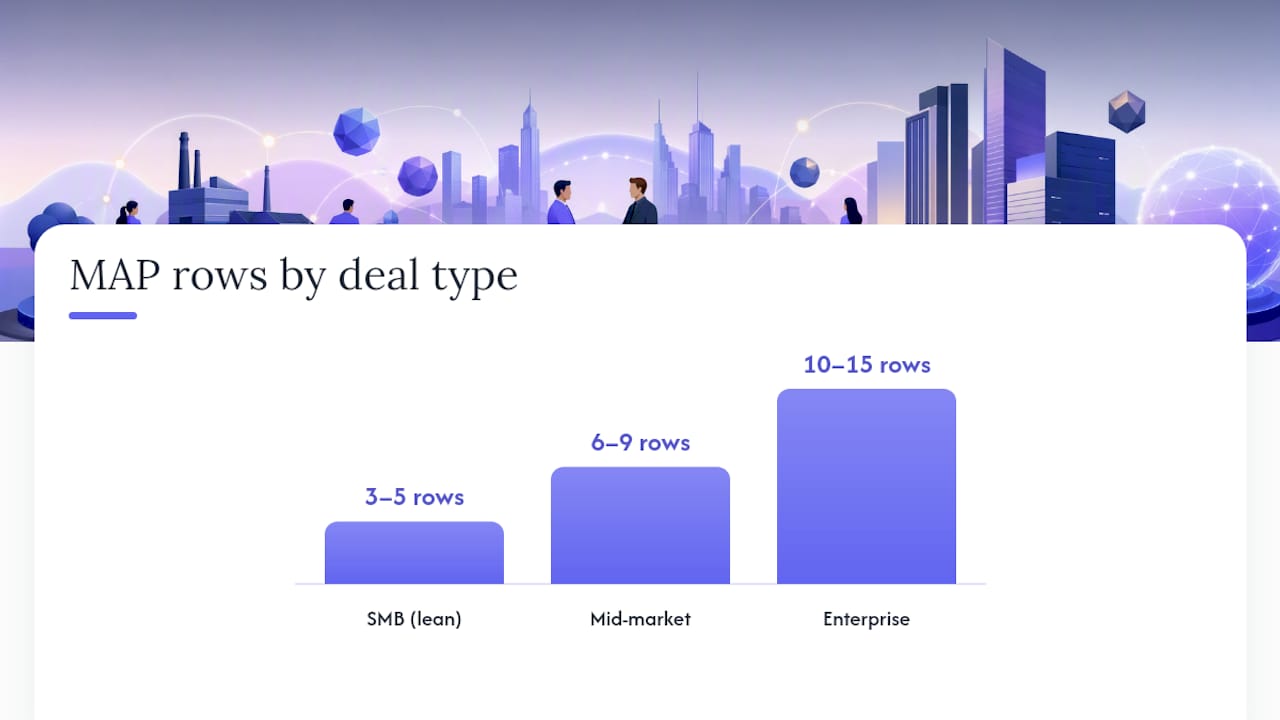
Row count should track deal complexity, not habit. A standard B2B mutual action plan template runs several milestones, and the shape changes a lot depending on how many gates the buyer’s organization requires before signature.
SMB (3 to 5 rows): Keep it lean. A compact plan might read: demo delivered, decision maker aligned, contract sent, signature, kickoff. Five rows with clear owners beat a 12-row plan nobody updates.
Mid-market (6 to 9 rows): This is where security and legal gates enter. A nine-row shape typically covers: discovery recap, technical demo, security questionnaire, business case review, procurement approval, legal redline, commercial sign-off, signature, and kickoff. Collapse rows that move fast; expand any that stall.
Enterprise (10 to 15 rows): Add procurement, vendor onboarding, and a formal InfoSec questionnaire as their own milestones. Terasu’s enterprise examples recommend an early “map buyer process” milestone, where the buyer walks you through their own internal steps and average lead times before you build the rest of the plan around them. That single row surfaces hidden approval chains weeks before they’d otherwise wreck your forecast.
As a rough sizing rule, match rows to cycle length: shorter cycles need fewer milestones and longer cycles require a larger number of milestones.
Running the MAP Day to Day: Cadence, Status, and CRM Rules
A mutual action plan that only gets touched once, at kickoff, is not a mutual action plan. It’s a PDF nobody remembers signing.
Review it fast and often. Spend two minutes on plan status at the start of every buyer-facing call, and run a longer internal sync weekly on any deal with more than three stakeholders on the buying side.
The status column should mean something specific, not just look tidy:
- On track — no action needed, keep moving
- At risk — assign a remediation owner and a new date immediately
- Overdue — escalate to both sides’ executive sponsors that day
- Done — locked, move to the next gate
One Gartner finding worth keeping in view here: many buying committees report internal conflict during evaluation, which is precisely why an “at risk” flag needs a name and a date attached, not just a color change.
Treat the signature row’s buyer-confirmed date as the one canonical close date in your CRM. Every forecast conversation should reconcile back to that date, backed by a meeting note or an email confirmation, not a rep’s optimistic guess.
Watch the signals the plan itself gives you. A buyer who adds their own rows, moves a date earlier, or edits the plan unprompted is telling you the deal is real. A buyer who never touches a shared plan, even inside a tracked deal room, is telling you something too.
TrailerCast’s Perspective: Making MAPs Live in a Single Deal Workspace
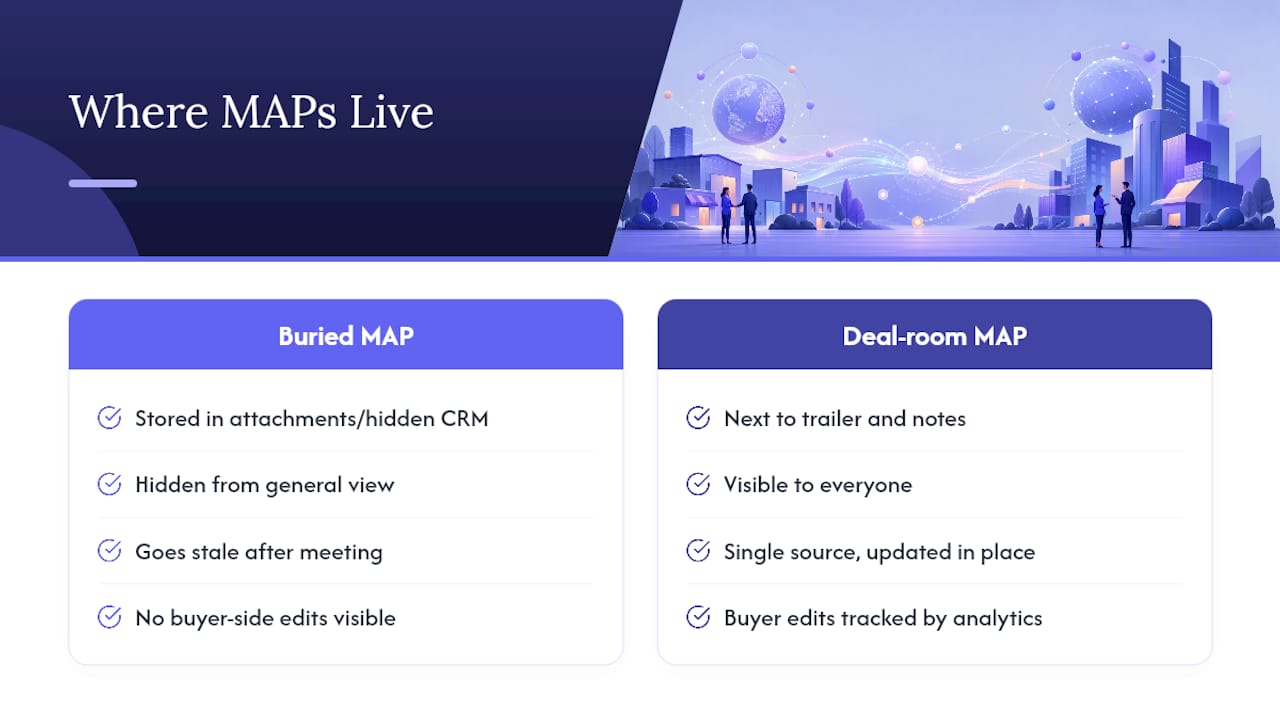
The mutual action plan was never the problem. The space between the calls where it lives was. A plan buried in an email attachment or a private CRM field goes stale the moment the meeting ends, and a champion has no way to keep it moving without you in the room.
That’s the gap a buyer-facing deal room closes: the MAP sits next to the demo trailer and the discovery notes, visible to everyone, updated in one place instead of three. When engagement analytics show a buyer opening and editing the plan on their own, you’re not guessing at momentum anymore. You’re watching it happen.
— Daniel
TrailerCast: For Teams That Want a Living MAP, Not a Buried Spreadsheet
A spreadsheet MAP works right up until it gets forwarded once and forgotten. The plan lives inside the same workspace as the call recordings, the demo trailer, and the buyer’s own activity, so a stalled milestone shows up the moment it happens instead of at the next status meeting.

Mutual action plan tracking pairs with buyer-facing deal rooms, AI-edited demo trailers, and embedded eSignature, so the plan you build in this article’s template can live somewhere buyers actually revisit and edit. Check the features overview to see how MAP tracking sits alongside deal room analytics, then start a free trial at Trailercast to build your first plan inside a workspace instead of a shared drive.
Selected Downloads and Recommended Reading
Start with the free Google Sheets mutual action plan template, which includes a filled example alongside the blank version. For a deeper look at plan structure across deal stages, Mural’s breakdown of MAP stages is worth a read, as is Chad Burmeister’s practitioner take on running joint plans day to day. If your deal needs approval routing, Jotform’s approval workflow app template offers a useful pattern for procurement gates.