Cut Prep to Under an Hour with Provenance First AI QBR Briefs for CSMs

An AI QBR brief turns a quarter’s live metrics and call transcripts into an executive-ready draft in minutes, not hours. The move is simple: pick one account, connect read-only sources like billing, CRM, and support, and run a draft. You review it, fix what’s off, and deliver a narrative built on real deltas instead of a static template nobody trusts.
TL;DR:
- Accurate data linkage and matching account IDs across systems are crucial to prevent stale or incorrect metrics in the AI-generated briefs.
- Review and validate all key figures, especially those with large deltas over 20%, by tracing them back to their sources and timestamps.
- Focus on detailed prompt structures that specify comparisons and insights to generate meaningful, checkable narratives rather than vague summaries.
- Ensure strict security controls with read-only access and documented audit trails to protect sensitive customer data during automation.
- Start automation with a single account to build a reliable process before scaling across multiple accounts, reducing errors and integration issues.
Table of Contents
- What Is an AI QBR Brief, and When Should You Use One?
- How Do You Actually Produce an AI QBR Brief, Step by Step?
- What Templates and Prompts Produce Usable Slide Content?
- What Mistakes Wreck an AI QBR Brief Before It Reaches the Customer?
- What Should IT and RevOps Check Before Turning on QBR Automation?
- How Trailercast Handles AI QBR Briefs (and Where I’d Still Double-Check)
- How Do You Audit and Version Control AI-Generated QBR Briefs?
- How Do You Choose the Right AI Tool for QBR Generation?
- How Can You Automate Data Extraction Without Adding Manual Work?
- What Security and Privacy Steps Matter Most With Sensitive Business Data?
- What I’d Prioritize If I Were Running This Rollout
- Try TrailerCast’s AI QBR Briefs Instead of Building From Scratch
- Sources
What Is an AI QBR Brief, and When Should You Use One?
An AI QBR brief is a generated draft, not a filled-in template. That distinction is the whole point: a template asks you to remember the quarter; an AI draft reconstructs it from evidence.
You’ll use this two ways. For customer-facing reviews, the AI drafts the deck you present to the buying committee, complete with a delta-driven exec summary. For internal reviews, it feeds your own leadership a rollup across ten or twenty accounts so you’re not manually copying numbers into a spreadsheet every Friday before the meeting.
A working draft should give you:
- A quarter-over-quarter comparison for every core metric, not just a snapshot
- Short narratives explaining the “why” behind each significant move
- Flagged risks pulled from support tickets, NPS comments, and stalled deal stages
- A first-pass next-quarter plan you can edit, not write from scratch
AI QBR generators can cut assembly time from several hours down to under an hour of review, because the draft arrives already grounded in account metrics instead of a blank slide.
How Do You Actually Produce an AI QBR Brief, Step by Step?
Producing a brief that survives a customer meeting takes five phases. Skip one and you’ll find the gap during the presentation, which is the worst possible time.
- Define the outcome and audience first. Is this a renewal-risk review for your own leadership, or a growth-story deck for the customer’s VP? The audience changes what the AI should emphasize.
- Map and connect your sources with read-only access. Scope each connector to the account or accounts you’re running, and confirm the date window matches across every system.
- Run the agent. The value here isn’t the raw export, it’s the comparison work: the agent should read live metrics, normalize them to one period, then compute deltas versus both the prior quarter and the account’s stated targets, writing a short narrative per metric.
- Review it like a human, not a rubber stamp. Check provenance on every headline figure, sanity-check anything that jumped more than 20% in either direction, and read the tone. An AI draft can sound confident about a number that’s simply wrong.
- Export and deliver. Pick your format based on the meeting, not habit.
Your review checklist before anything leaves your desk:
- Does every key figure link back to a source and timestamp?
- Do the deltas match what you remember from last quarter’s notes?
- Did you spot-check at least one cited transcript quote against the actual call?
- Does the risk section reflect what support and NPS are actually saying, not a generic template line?
Vendor tools built for this stage focus on context-aware slide layouts so the output looks like something you built, not a raw data dump. Whether you export to slides, a one-page brief, or both, the human review step in phase four is the one you never shortcut.
What Templates and Prompts Produce Usable Slide Content?
A generic prompt gives you a generic deck. The prompts that work are specific about structure, and they name exactly what each slide needs.
A solid slide-by-slide skeleton looks like this:
- Slide 1, agenda: what the meeting covers and how long each section runs
- Slide 2, executive summary: one paragraph on account health, the single biggest win, and the single biggest risk
- Slide 3 to 5, KPI trends: usage, revenue, and support metrics with quarter-over-quarter and versus-target deltas
- Slide 6, wins: specific outcomes tied to stakeholder names where possible
- Slide 7, risks: anything flagged by support tickets, sentiment drops, or stalled pipeline stages
- Slide 8, next-quarter plan: three to five concrete commitments, owned by name
For prompt patterns, be explicit about the comparison you want. Instead of “summarize usage,” try: “Compare this quarter’s active-seat count to last quarter and to the account’s adoption target. Write two sentences explaining the direction of the change.” That kind of prompt, similar to the patterns in purpose-built QBR prompt libraries, forces the AI toward a specific, checkable claim instead of a vague summary.
Save your best-performing prompts somewhere your whole team can reuse them, and version them. When you tweak a prompt because it kept mislabeling a metric, note what changed and why, so the next person doesn’t reintroduce the same bug three months later. Trailercast maintains a QBR template built around this exact slide structure if you want a starting point rather than building from scratch.
What Mistakes Wreck an AI QBR Brief Before It Reaches the Customer?
The most common failure is a date mismatch. One source updated last night, another hasn’t refreshed in three weeks, and the brief blends stale numbers with fresh ones without flagging the gap. Close behind that: an unscoped connector that pulls every account instead of the one you’re reviewing, and a narrative that sounds specific but was never actually grounded in real data, which is the AI equivalent of a plausible guess.
Catch these before delivery with three checks:
- Trace every headline number back to its source and timestamp
- Run a sanity check on any delta larger than 20% in either direction
- Spot-check one transcript quote against the actual recording
Keep a human sign-off gate on every brief before it leaves your hands, and review your prompt templates quarterly since account structures and metrics shift over time.
Pro Tip: Keep a running log of every correction you make to an AI draft. After three or four QBRs, patterns emerge, usually the same metric or the same source causing the same mistake, and you can fix the root cause instead of correcting it every quarter.
What Should IT and RevOps Check Before Turning on QBR Automation?
Before any AI agent touches customer data, RevOps and IT need a short governance pass. This isn’t optional paperwork. It’s what keeps a QBR tool from becoming a security incident.
- Read-only access only. Scoped API keys that can query but never write or delete protect you from an agent accidentally modifying a live record.
- Account ID mapping. Confirm the same customer resolves to the same ID across CRM, billing, and product analytics before you trust any cross-system delta.
- Currency and date normalization. Multi-currency accounts and mismatched fiscal calendars produce deltas that look dramatic but are just unit errors.
- Audit trail storage. Keep the source link and timestamp behind every figure the AI cites, stored somewhere retrievable, not just in the chat window where it was generated.
That last point matters more than it sounds. A human-in-the-loop signoff that checks provenance per key figure, using a simple source-link-plus-timestamp pattern, catches most errors before they ever reach a customer’s screen.
How Trailercast Handles AI QBR Briefs (and Where I’d Still Double-Check)
QBR briefs can be built from deal history including call transcripts, demo trailer engagement, and stakeholder activity inside a Decision Room. The AI pulls deltas across the quarter and drafts a narrative grounded in what actually happened on calls, not a guess about what probably happened.
What it automates well:
- Compiling talk-time and qualification data from every call into a coherent quarter-long summary
- Surfacing which stakeholders engaged with which content, and when
- Drafting the first pass of wins, risks, and next-quarter commitments
What still needs your eyes: any causal claim (“usage dropped because of the pricing change”) and anything touching a renewal decision. Keep the source transcript linked to every quoted claim, and save the draft-plus-final version pair for your own audit trail before you present it.
How Do You Audit and Version Control AI-Generated QBR Briefs?
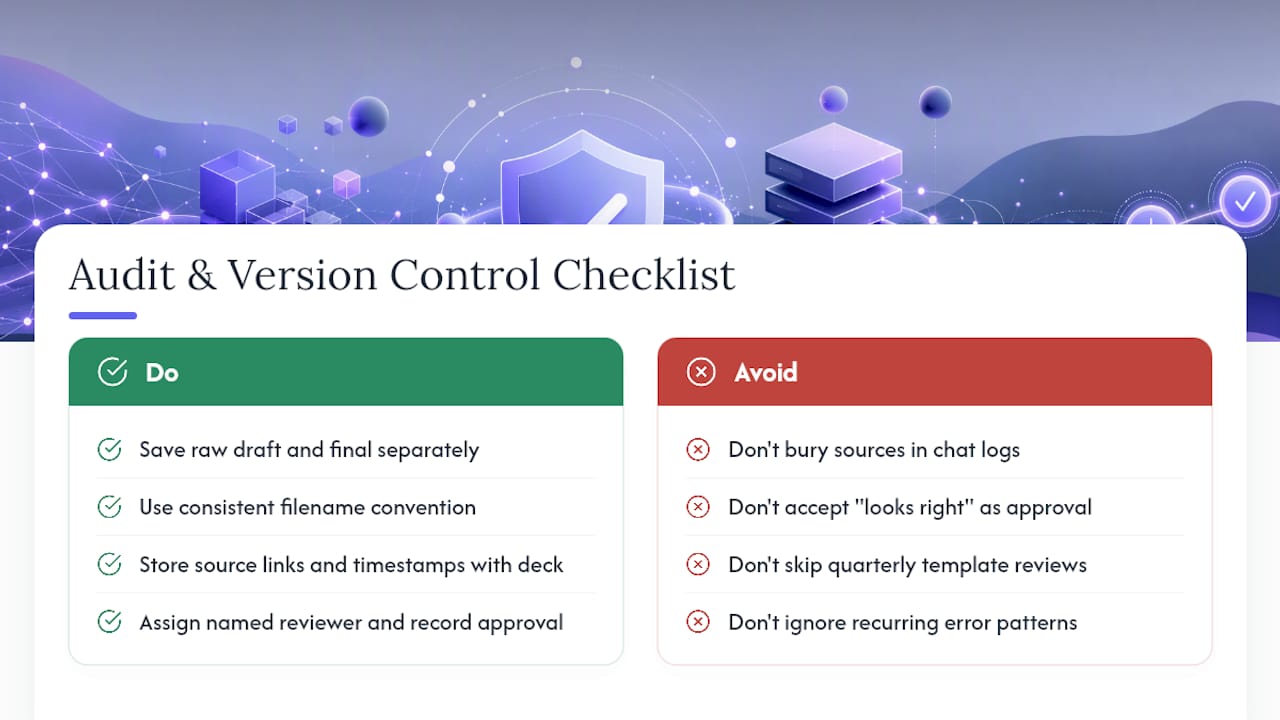
Treat every AI-generated brief the way you’d treat a financial report: with a version history and a clear owner. Save the raw draft separately from the edited final. If a customer later disputes a number, you need to show exactly what the AI generated versus what a human changed and why.
Name your files with a consistent convention, something like account name, quarter, and version number, so a six-month-old brief is retrievable without guesswork. Store the source links and timestamps for every headline figure alongside the deck itself, not buried in a chat log that disappears after 30 days.
Set a fixed review cadence for your prompt templates and skills, not just the briefs themselves. A prompt that worked well in Q1 can start producing subtly wrong narratives by Q3 if your product’s metrics or account structures changed underneath it. Quarterly template reviews catch that drift before it compounds across dozens of accounts.
Assign a named human reviewer for every brief before it leaves your team, even when the draft looks polished. “Looks right” and “is right” are different bars, and the gap between them is exactly where a wrong number slips into a customer-facing deck. Document who approved each version. When compliance or leadership asks how a number got into a presentation six months later, you want a one-line answer, not an investigation.
Finally, keep a change log for any recurring error pattern. If the same metric misfires twice, that’s a signal to fix the source mapping, not just the individual brief.
How Do You Choose the Right AI Tool for QBR Generation?
Start with what the tool can actually read, not what it claims to summarize. A tool that only ingests a CSV export forces you to manually update it every quarter, which defeats the purpose. Look for direct, read-only connections to your CRM, billing system, product analytics, and support platform.
Next, check whether the tool computes comparisons or just displays raw numbers. The real value in a QBR agent is the delta work: quarter-over-quarter and versus-target comparisons, with metrics flagged when direction and plan diverge, say a number rising quarter over quarter but still landing below its target. A tool that skips this step just hands you a dashboard with extra words attached.
Confirm the output format matches how you actually present. Some teams need slides. Others need a one-page decision brief for an internal rollup. A well-built tool can output structured, slide-by-slide markdown that maps directly onto a deck instead of a paragraph you have to reformat by hand.
Ask about the human-in-the-loop step directly. If a vendor can’t clearly explain how you review and approve a draft before it goes to a customer, that’s a gap worth flagging before you sign anything. Finally, weigh scoped access controls: a tool that only needs read-only, account-scoped permissions is a smaller security footprint than one demanding broad write access to your systems.
How Can You Automate Data Extraction Without Adding Manual Work?
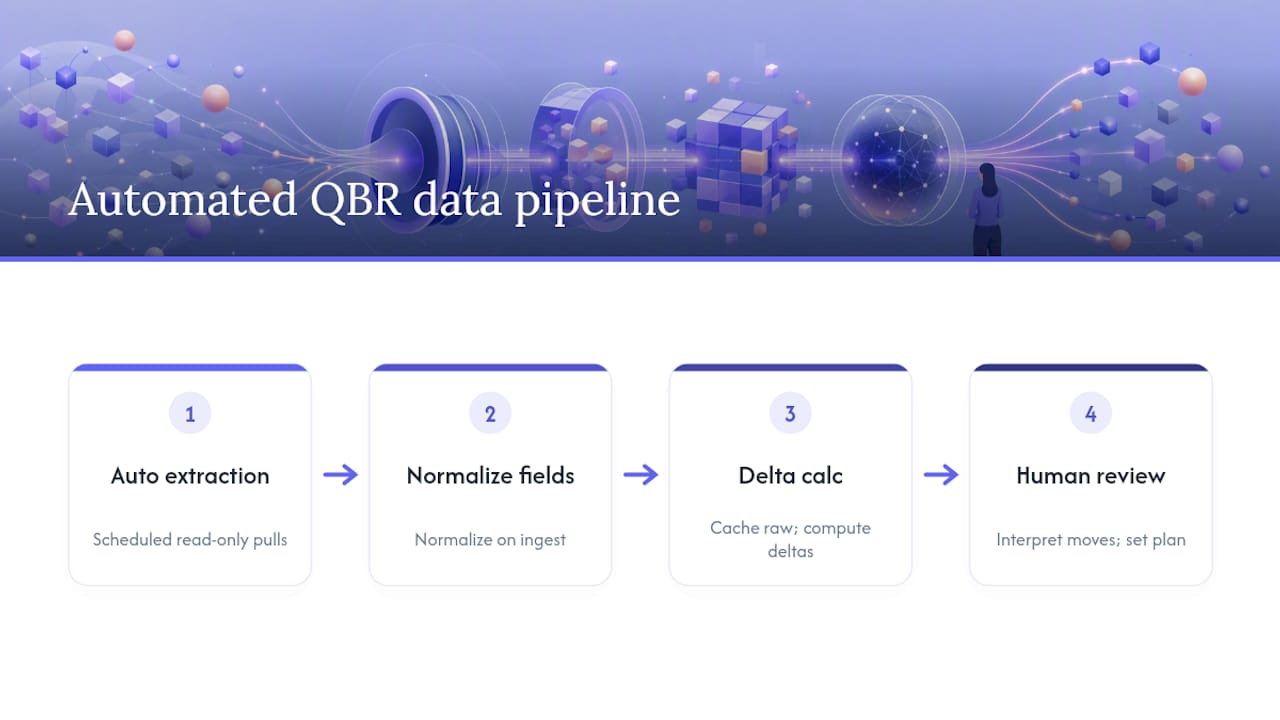
The goal is a pipeline that runs itself between quarters, not a monthly export ritual. Set up scheduled, read-only pulls from each source system rather than manual CSV exports. A scheduled auto-builder pattern that gathers CRM, usage, support, and meeting notes on a fixed cadence removes the recurring task of remembering to pull data before every review cycle.
Normalize fields at the point of extraction, not later. Convert currencies, align date windows, and standardize account IDs as data comes in, so by the time the AI runs its comparisons, it’s working from clean, matched records instead of reconciling mismatches on the fly.
Cache raw pulls before any transformation happens. If a delta looks wrong later, you want the original untouched export to check against, not just the processed version. This single habit saves hours of detective work when a number gets questioned.
Automate the parts that are purely mechanical, extraction, normalization, delta calculation, and reserve human time for the parts that require judgment: interpreting why a metric moved and deciding what belongs in the next-quarter plan. That split is where most of your time savings actually come from.
What Security and Privacy Steps Matter Most With Sensitive Business Data?
Customer revenue figures, support tickets, and call transcripts are sensitive by default, and a QBR agent touches all three at once. Start with scoped, read-only API keys for every connected system. An agent that can query but never write or delete removes an entire category of risk before you even think about the AI’s output.
Limit each connector’s scope to the specific accounts under review rather than granting blanket access to your entire CRM. A misconfigured connector that pulls every customer’s data when you only meant to review one account is both a privacy problem and, depending on your contracts, potentially a compliance one.
Store audit logs of what the AI accessed and when, separate from the briefs themselves. If a customer or an internal compliance team asks what data touched the generation process, you need a retrievable answer, not a shrug.
Be deliberate about where drafts live before final review. A brief sitting in an unsecured shared folder, even temporarily, is a sensitive-data exposure waiting to happen. Route drafts through the same access controls you’d apply to the underlying source systems, and confirm your AI vendor’s data retention policy before you connect anything containing customer financials or transcripts.
What I’d Prioritize If I Were Running This Rollout
Most advice on AI QBRs focuses on the wrong bottleneck. People obsess over slide design and narrative tone when the real risk sits earlier: provenance. If you can’t trace a headline number back to its source and timestamp, the polish on your deck doesn’t matter.
The conventional advice to “let the AI write the whole narrative” also undersells how much judgment a good QBR still needs, and how important AI sales training for managers is to enable proper coaching and interpretation of AI outputs. The agent should compute deltas and flag divergence between direction and target. A human should still decide what that divergence means for the relationship. Automate the arithmetic, not the interpretation.
If you’re just starting, don’t try to automate twenty accounts in week one. Scope one account, run one draft, and build your review muscle before you scale the workflow across your whole book.
— Daniel
Try TrailerCast’s AI QBR Briefs Instead of Building From Scratch
If you’ve been stitching together call notes, CRM exports, and a stale slide template every quarter, Trailercast removes that assembly work entirely because it already has the deal history: every call transcript, demo trailer, and Decision Room interaction sits in one workspace instead of five disconnected tools.

The QBR briefs feature can draft KPI deltas, risk flags, and a next-quarter plan grounded in what actually happened on calls, rather than a guess reconstructed from memory. Teams evaluating fit can start with a free trial, no credit card required, and check the pricing once they’ve seen a real draft against one of their own accounts. If you want to see how the pieces connect first, the feature overview walks through transcripts, demo trailers, and handoff briefs alongside the QBR capability.
Try the AI QBR briefs feature on one account this week, or grab the QBR template if you want a structure to fill in manually before you automate the rest.
Sources
The brief is only as good as what it can see. If the AI can’t reach a system, it either skips that section or, worse, guesses. Neither is acceptable in front of a customer’s VP.
Here’s the minimum connection list and the fields that actually matter:
- AI Agent for Quarterly Business Review: How It Works | Gravity AI
- QBR Deck Builder — QBR deck outlines from customer usage and ROI data
- QBR Auto-Builder | Cassidy AI
Align every source to the same date window before you run anything. A CRM export pulled on the 1st and a usage export pulled on the 15th will silently mismatch, and the AI has no way to know that unless you tell it. Match account IDs across systems too. A mismatched ID is the single most common reason a brief quietly drops a whole data source without anyone noticing until the meeting.
When a source is missing, don’t let the AI fill the gap with a guess. Mark that section “data not available” and have a human add context manually.
Pro Tip: Before your first run, export one account’s data from each source and manually check that the account ID and date range match across all five systems. Five minutes of checking here saves you from presenting a wrong number to a customer.