Best Fireflies Alternatives for Sales Teams (2026)

If your team runs multi-stakeholder B2B deals, Trailercast is the strongest alternative to Fireflies.ai because it combines meeting capture with AI-edited demo trailers, buyer-facing decision rooms, and post-close handoff briefs in one workspace. No other tool in this category closes the loop from first call to signed contract without tool chaining.
That said, Trailercast isn’t the only answer. The right pick depends on what your team actually needs:
- Multi-stakeholder B2B sales teams that need capture + demo clips + buyer rooms: Trailercast
- Teams that need live captions and zero admin setup: bot-based live transcription tools (Otter.ai, Fathom, MeetGeek, Sembly)
- Teams focused on shareable video highlights: video-first clippers (tl;dv, Read AI)
- Privacy-sensitive or in-person capture needs: bot-free local recorders
- Enterprise coaching and forecasting: deep conversation intelligence platforms (Gong, Avoma)
- Lightweight automation and task filing: workflow-first tools (Jamie, Lindy)
The Fireflies.ai competitive landscape has expanded sharply, and the right choice now turns on workflow fit, not just transcription quality.
Key Takeaways
The right Fireflies alternative depends on your capture surface, privacy model, and how far downstream your workflow needs to go.
| Point | Details |
|---|---|
| Trailercast for B2B sales | Multi-stakeholder sales teams get capture, demo trailers, decision rooms, and handoff briefs in one flat-fee workspace. |
| Bot-based transcribers for live captions | Tools like Otter.ai, Fathom, MeetGeek, and Sembly work best for scheduled video calls with zero admin setup. |
| Video-first clippers for async sharing | tl;dv and Read AI excel when post-meeting clip distribution matters more than integrated deal workflows. |
| Bot-free recorders for privacy | System-audio capture tools cover in-person, phone, and privacy-sensitive contexts that calendar bots cannot reach. |
| Test AI costs in every pilot | Credit-gated AI features are the most common source of TCO surprises; map your actual usage volume before committing. |
Table of Contents
- How do the top Fireflies alternatives compare at a glance?
- Why do teams search for Fireflies alternatives?
- Why Trailercast beats the standard Fireflies workflow for B2B sales
- What does the bot-based live transcription archetype offer?
- When does a video-first clipping tool beat a transcription-only recorder?
- Which niche and enterprise archetypes cover specialized needs?
- How do you choose the right Fireflies alternative for your team?
- Why end-to-end deal workspaces change the choice for B2B sales teams
- What are the top alternatives worth trialing right now?
- Per-tool breakdown: why each beats Fireflies on a specific dimension
- What does pricing actually look like across these tools?
- How easy is it to adopt a new meeting tool?
- What support can you expect from these tools?
- How good are the mobile apps for these tools?
- The case for picking a deal workspace over a meeting recorder
- Trailercast is built for the space between your calls
- Sources used to build this roundup
How do the top Fireflies alternatives compare at a glance?
| Archetype | Best for | Starting price / free plan | Transcription & languages | Integrations | Privacy / capture model | Standout feature | Enterprise / security |
|---|---|---|---|---|---|---|---|
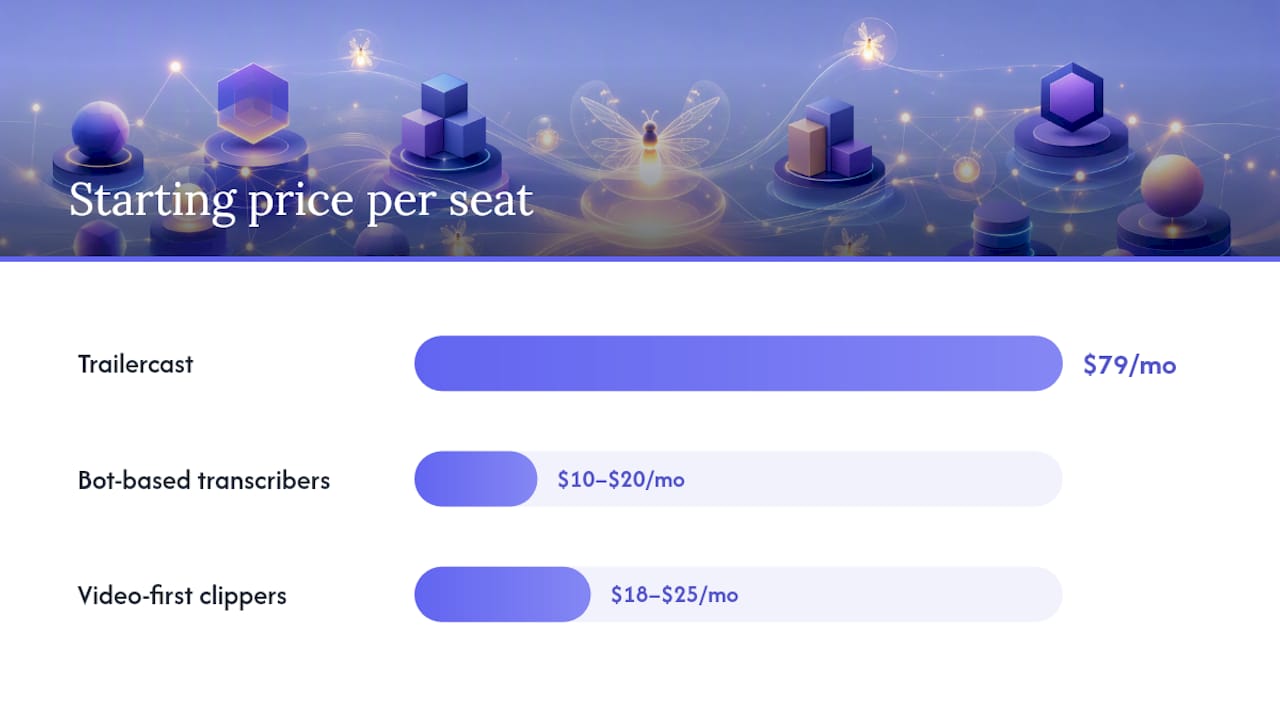
| Trailercast | Multi-stakeholder B2B sales | $79/seat/mo ($59 annual); free trial | High accuracy; 15+ languages | Zoom, Meet, Teams, Google/Microsoft calendar, CRM (enterprise) | Bot joins scheduled calls; browser recording (no install) | AI-edited demo trailers, decision rooms, eSignature, post-close handoff | SSO/SAML, custom DPA, data residency (enterprise add-on) |
| Bot-based live transcribers | Scheduled video meetings, live captions | Free tiers available; paid from ~$10–$20/seat/mo | Good on clear audio; variable on accents/noise | Zoom, Meet, Teams, calendar, some CRM | Bot joins calls | Real-time captions, searchable archive, AI summaries | Varies; SOC 2 common at paid tiers |
| Video-first clippers | Shareable highlights, async stakeholders | Free tiers; paid from ~$18–$25/seat/mo | Good; multilingual on paid tiers | Zoom, Meet, Teams, clip-sharing workflows | Bot joins calls | Timestamped clips, highlight reels, cross-meeting search | Varies; SSO at enterprise tiers |
| Bot-free local recorders | In-person, phone, privacy-first teams | Free tiers (limited); paid from ~$12/mo | Good on device; variable offline | Calendar, storage; lighter CRM | No bot; system audio or phone bridge | On-device capture, phone call bridging | Limited enterprise features |
| Enterprise conversation intelligence | Sales coaching, forecasting, deep CRM | Premium pricing; limited or no free tier | High accuracy; multilingual | Deep CRM (Salesforce, HubSpot), calendar, dialers | Bot joins calls | Deal scoring, coaching playlists, pipeline forecasting | SOC 2, SSO, DPA, data residency |
| Workflow-first automation tools | PM task filing, ticket generation | Free tiers; paid from ~$15–$25/seat/mo | Adequate; fewer languages | Slack, Notion, Jira, CRM | Bot or upload-first | Auto-filed tasks, meeting agendas, integrations | Basic; SSO at higher tiers |
Why do teams search for Fireflies alternatives?
The frustration is real, and it usually shows up in one of five ways. User reviews on G2 consistently surface transcription accuracy variance on accented speech and noisy environments, and the credit-gated AI feature model catches teams off guard when usage scales.
- Credit-gated AI costs and hidden overages. Fireflies charges AI credits for summaries, action items, and search. Teams that use these features heavily hit unexpected costs fast. Market analysis from Toarn documents how Fireflies’ Live Assist feature, launched in late 2025, adds another credit-consumption layer, creating total cost of ownership (TCO) exposure for high-volume users.
- Intrusive meeting bots. A bot joining a client-facing call uninvited is a trust problem. Prospects notice. Sales reps in sensitive negotiations often want capture without a visible third party in the room.
- Poor capture for non-scheduled or in-person conversations. Fireflies is built around calendar-connected video calls. Phone calls, in-person meetings, and ad-hoc conversations fall through the cracks. Bot-free alternatives solve this with system-audio capture and phone bridging.
- Transcription quality on accents and background noise. This is the most common complaint in third-party reviews. Accuracy degrades on non-native English speakers and in open-plan office environments.
- Privacy and biometric data concerns. BIPA (Illinois Biometric Information Privacy Act) class-action headlines have put voiceprint collection on legal teams’ radar. Independent roundups note that privacy concerns are now a primary driver for teams moving to bot-free or on-device capture options.
- Integration and CRM depth. Fireflies syncs notes to CRM, but field mapping, deal-stage routing, and custom object support vary. Teams with complex RevOps setups often find the integration shallow.
- Mobile and offline capture gaps. Sales reps in the field need mobile capture. Most bot-based tools are weak here.
Why Trailercast beats the standard Fireflies workflow for B2B sales
Fireflies captures calls. Trailercast captures deals. That distinction matters when your average opportunity involves a CFO, a CISO, and a procurement lead who were never on the same call.
Pros:
- Full deal lifecycle in one workspace: calls, demos, decision rooms, eSignature, post-close handoff
- AI-edited demo trailers personalized per stakeholder (CFO trailer on pricing, CISO trailer on security)
- Meeting recording with speaker-by-speaker transcription, talk-time analysis, and qualification verdicts
- Decision rooms with per-stakeholder engagement tracking and champion attribution trees
- Post-close AI Handoff Brief fires automatically to Customer Success the moment a contract signs
- Flat-fee pricing with no AI credit gating: $79/seat/month, or $59 billed annually
- Browser recording option requires no install, no bot
Cons:
- Not the right fit for teams that only need a lightweight note-taker for internal standups
- Enterprise add-ons (SSO/SAML, custom DPA, white-label, native CRM sync) require a separate contract
- Overkill for solo users or teams with simple, single-stakeholder sales
Pricing: One tier, every feature, no gating. $79/seat/month or $59/seat/month billed annually. Free trial, no credit card required. The first 100 paid teams lock in 20% off for the life of the account.
Why it beats Fireflies for B2B sales: Fireflies gives you a transcript and a summary. Trailercast gives you a deal brief that spans every call, a branded trailer your champion can forward to the CFO, a decision room where the buying committee can ask questions, and a handoff brief that lands in CS the second the contract signs. For 11–200 employee B2B SaaS teams running 3–7 stakeholder deals, that’s the difference between a tool and a workflow.
Bottom line: If you’re a CRO, VP of Sales, or RevOps leader evaluating the full cost of your sales stack, Trailercast consolidates five tools into one. See the full feature breakdown and the AI sales tool page for specifics on demo trailers and decision rooms.
Pro Tip: Before your trial, map every tool your team currently uses between “call ends” and “contract signs.” Trailercast’s value is clearest when you count the handoffs you’re currently doing manually.
What does the bot-based live transcription archetype offer?
This is what most people picture when they say “Fireflies alternative”: a calendar bot that auto-joins your Zoom, Meet, or Teams calls, transcribes in real time, and drops a summary with action items into your inbox afterward. Tools in this archetype include Otter.ai, Fathom, MeetGeek, and Sembly.
Pros:
- Zero setup friction: connect your calendar, and the bot handles the rest
- Real-time captions are genuinely useful for accessibility and focus
- Searchable meeting archives let you pull up any call by keyword
- AI summaries and action items save 10–15 minutes of post-call admin per meeting
- Free tiers are generous enough for light users (typically 300–800 minutes/month depending on the tool)
Cons:
- Bot-sensitive contexts (client calls, board meetings, sensitive negotiations) are a problem
- In-person and phone calls are not captured
- Transcription accuracy drops on accented speech and noisy audio
- AI features are often credit-gated at scale, replicating the exact Fireflies pain point you’re trying to escape
- Limited CRM field mapping beyond basic note sync
Pricing shape: Free tiers exist across most tools in this archetype. Paid plans typically start in the $10–$20/seat/month range, with AI features unlocked at higher tiers.
Who should pick this archetype: Teams running mostly scheduled video calls internally, where a bot in the room is unremarkable and live captions add real value. Check that the tool you choose supports your CRM natively (not just via Zapier), that AI summaries are included in the base plan rather than credit-gated, and that the calendar integration covers both Google and Microsoft.
When does a video-first clipping tool beat a transcription-only recorder?
The video-first archetype, led by tools like tl;dv, emerged from a specific insight: a transcript is searchable, but a 90-second clip is shareable. TechCrunch covered tl;dv’s early positioning as a video productivity tool built around clipping and distribution, not just archiving. That framing still defines the category.
Pros:
- Timestamped clips are easy to share with stakeholders who weren’t on the call
- Highlight reels work well for async sales follow-up and internal coaching
- Cross-meeting search lets you find every time a competitor was mentioned across all your calls
- G2 reviews for tl;dv consistently praise the clip-sharing UX and the speed of finding moments
Cons:
- Phone and in-person capture are not supported
- Deep CRM analytics (deal scoring, pipeline forecasting) are outside this archetype’s scope
- Some users report that the bot interface and notification behavior can feel intrusive in smaller calls
- Advanced features often sit behind higher-tier plans
Pricing shape: Free tiers are available. Paid plans typically start around $18–$25/seat/month, with multilingual transcription and advanced search at higher tiers.
Bottom line: Pick this archetype when post-meeting distribution matters more than integrated deal workflows. If your team’s primary pain is “we need to share the right 2 minutes of a demo with a stakeholder who missed the call,” a video-first clipper solves that cleanly. If you need that clip to live inside a buyer-facing room with engagement tracking, you’re describing Trailercast’s demo trailer and decision room workflow.
Which niche and enterprise archetypes cover specialized needs?
Not every team fits the bot-based transcriber or video clipper mold. Here are the archetypes that serve narrower but important use cases.
How do you choose the right Fireflies alternative for your team?
Start with your capture surface. Everything else follows from that.
- Map your capture surface first. Do you need video call capture, phone call capture, in-person capture, or all three? If it’s not just scheduled video calls, eliminate any tool that only supports a calendar bot.
- Decide your privacy model. Is a bot joining client calls acceptable? If not, filter to bot-free options immediately.
- List your required integrations. CRM (which one, and how deep), calendar platform, and meeting platform. Verify native support, not just Zapier.
- Audit the AI cost model. Flat-fee or credit-gated? Ask vendors exactly what triggers a credit charge. This is where TCO surprises hide.
- Set a language accuracy threshold. If your team or prospects speak English with non-native accents, test accuracy on a real sample before committing.
- Check enterprise requirements. SSO/SAML, custom DPA, data residency, audit logs. If you need them, confirm they’re available before the trial ends.
- Assess workflow fit. Do you need just a transcript, or do you need clips, buyer rooms, and handoff briefs? The answer determines whether you need a recorder or a deal workspace.
Vendor questions to ask in trials:
- How do you handle voiceprints and biometric data? Do you store them, and for how long?
- What exactly counts toward AI credit consumption?
- Is local or bot-free recording available?
- Which CRM objects do you sync natively, and can we map custom fields?
- What is your data residency policy, and can we choose a region?
- Is SSO/SAML included in the base plan or an add-on?
- Do you provide a DPA, and what are the SLA terms?
- What is your audit log retention period?
- How does pricing change if we add seats mid-contract?
- What support channels are available, and what are the response time SLAs?
Red flags to watch for:
- AI credit systems with no clear usage dashboard
- SSO and DPA only available at enterprise tiers with no published pricing
- No audit log or data export option
- Mobile app that only views transcripts rather than capturing new recordings
- Transcription accuracy claims with no accent or noise-condition caveats
Pro Tip: Run a 7-day pilot that covers at least three call types: a scheduled video call, a phone call or in-person meeting, and an upload of a pre-recorded session. This surfaces capture gaps and AI cost surprises faster than any demo.
Why end-to-end deal workspaces change the choice for B2B sales teams
Here’s the argument most meeting-tool roundups miss: for multi-stakeholder B2B deals, a transcript is not the deliverable. The deliverable is a buying committee that understands your product well enough to approve it internally, without you in the room.
A transcript captures what was said. It does not help your champion re-sell the value to a CFO who skipped the demo. It does not give the CISO a security-focused clip they can share with their team. It does not track whether the procurement lead opened the proposal or forwarded it to someone new. Trailercast’s AI sales library ranks content per deal and surfaces the right clip for the right stakeholder automatically, closing the gap between “great call” and “internal approval.”
The pattern holds across categories: teams choose alternatives when a specific workflow gap is decisive, not when one tool scores marginally better on a feature checklist. For B2B sales teams, that gap is almost always the space between conversations.
Fireflies’ own product roadmap confirms the direction: the platform launched an MCP server in mid-2025 and Live Assist in late 2025, signaling a move from recorder to data infrastructure layer. That’s a meaningful strategic shift, but it also means the product is optimizing for developer integrations and API access rather than the sales workflow outcomes that AEs and CROs actually measure.
For revenue teams running complex deals, the question isn’t “which tool transcribes best?” It’s “which tool keeps the deal coherent between conversations?” Capture is table stakes. What happens after the call ends is where deals are won or lost.
Choosing a capture-first archetype without downstream workflow integrations forces your team to manually clip demos, paste summaries into email, and re-key deal context into CRM after every call. That’s not a transcription problem. It’s a TCO problem, and it compounds with every stakeholder added to the deal.
What are the top alternatives worth trialing right now?
Here’s a quick shortlist of the tools that come up most often in 2026 comparisons, mapped to the archetype they represent.
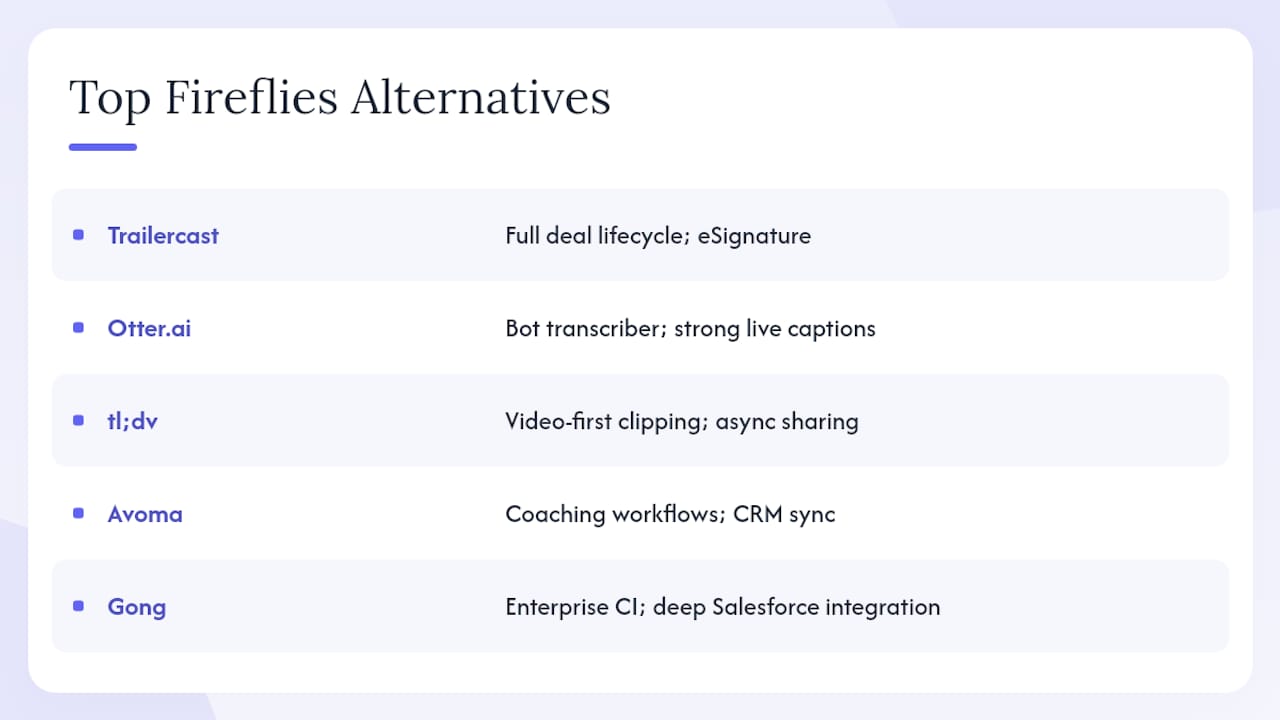
Trailercast is the pick for B2B sales teams that need the full deal lifecycle. Discovery call capture, AI-edited demo trailers, decision rooms, eSignature, and post-close handoff briefs in one workspace. The flat-fee model ($79/seat/month, or $59 annual) means no credit surprises.
Otter.ai is the most widely recognized bot-based transcriber. Strong on live captions and searchable archives. The free tier is generous for individuals. AI features are gated at higher tiers, which replicates the Fireflies credit problem at scale.
tl;dv leads the video-first clipping archetype. Excellent clip sharing and cross-meeting search. Best for teams whose primary use case is async stakeholder distribution rather than integrated deal workflows.
Fathom is a clean, lightweight bot-based transcriber with a strong free tier and fast summaries. Popular with individual AEs who want zero-friction note-taking without a complex setup.
Read AI combines meeting transcription with engagement scoring and meeting quality metrics. Useful for managers who want to coach on meeting effectiveness, not just capture content.
Jamie focuses on structured meeting notes and agenda generation without a bot. Works well for teams that want clean outputs without a visible recorder in the room.
Sembly offers team-level meeting intelligence with shared workspaces and cross-meeting analytics. A step up from individual transcribers for teams that want shared visibility.
MeetGeek combines transcription with meeting templates and a searchable video library. Good for teams that run recurring meeting types (discovery, demo, QBR) and want structured outputs by default.
Avoma sits between a lightweight transcriber and a full conversation intelligence platform. Strong on coaching workflows and CRM sync. Better fit for mid-market sales teams than enterprise.
Gong is the enterprise standard for conversation intelligence. Deep Salesforce integration, deal risk scoring, and rep coaching at scale. Significant investment in implementation and licensing.
Lindy takes an automation-first approach, turning meeting outputs into structured workflows across Slack, Notion, and CRM. Best for operations teams rather than sales-specific workflows.
Per-tool breakdown: why each beats Fireflies on a specific dimension
| Tool | Why it beats Fireflies here | Pricing shape | Free plan? | Bottom line |
|---|---|---|---|---|
| Trailercast | Full deal lifecycle: capture + demo trailers + decision rooms + handoff | $79/seat/mo ($59 annual) | Free trial | Best for multi-stakeholder B2B sales |
| Otter.ai | Generous free tier; strong live captions | From ~$10/seat/mo | Yes | Best for individuals and small teams on a budget |
| tl;dv | Clip sharing and cross-meeting search | From ~$18/seat/mo | Yes | Best for async video distribution |
| Fathom | Fast summaries; clean free tier | Free; paid from ~$15/seat/mo | Yes | Best for individual AEs wanting zero friction |
| Read AI | Meeting quality scoring and engagement metrics | From ~$18/seat/mo | Yes (limited) | Best for managers coaching on meeting effectiveness |
| Jamie | Bot-free; structured notes without a visible recorder | From ~$25/seat/mo | Yes (limited) | Best for privacy-conscious teams |
| Sembly | Team-level shared workspaces and cross-meeting analytics | From ~$10/seat/mo | Yes | Best for teams wanting shared meeting intelligence |
| MeetGeek | Meeting templates and structured outputs by type | From ~$15/seat/mo | Yes | Best for teams with recurring meeting formats |
| Avoma | CRM sync depth and coaching workflows | From ~$18/seat/mo | Yes (limited) | Best for mid-market sales coaching |
| Gong | Enterprise deal scoring and pipeline forecasting | Custom pricing | No | Best for large sales orgs with RevOps investment |
| Lindy | Automation-first: tasks, tickets, CRM updates | From ~$15/seat/mo | Yes | Best for ops teams filing structured outputs |
What does pricing actually look like across these tools?
Most tools in this category offer a free tier, but the free tier almost never includes the AI features you actually want. That’s the pattern worth understanding before you commit.
Bot-based transcribers typically offer 300–800 minutes of free transcription per month, with AI summaries, action items, and search locked behind paid plans starting around $10–$20/seat/month. The credit-gated model means that heavy users, specifically sales teams running 5–10 calls per day, can hit unexpected costs quickly.
Video-first clippers follow a similar structure: free tiers for basic recording and limited clips, with cross-meeting search and advanced sharing at $18–$25/seat/month.
Enterprise conversation intelligence (Gong, Avoma at higher tiers) operates on custom pricing. Expect a meaningful per-seat investment, implementation costs, and annual contracts.
Trailercast’s flat-fee model at $79/seat/month (or $59 annual) is positioned as a consolidation play: one price for everything, no credit gating, no add-on fees for AI features. The enterprise add-ons (SSO/SAML, custom DPA, white-label, native CRM sync) sit on top as custom contracts.
The honest TCO calculation for any tool should include: base subscription, AI feature tier, CRM integration add-ons, overage or credit costs at your actual usage volume, and any enterprise security requirements. Run that math before you sign.
How easy is it to adopt a new meeting tool?
Adoption friction is underrated as a selection criterion. The best-featured tool your team doesn’t use consistently is worse than a simpler tool they actually open.
Bot-based transcribers win on initial setup: connect your calendar, and the bot handles everything. No training required. The risk is that teams stop reviewing transcripts after the first week because the outputs don’t connect to their actual workflow.
Video-first clippers have a slightly higher learning curve around clip creation and sharing, but the payoff is visible: a clip your champion can forward is a tangible output that reinforces the habit.
Enterprise conversation intelligence platforms (Gong, Avoma) require the most onboarding. Expect a structured rollout, manager training, and a few weeks before reps use the coaching features consistently.
Trailercast’s onboarding is designed around the deal lifecycle: AEs see value in the demo trailer within the first week, RevOps sees value in the decision room engagement data within the first deal cycle. The sales handoff brief is often the feature that converts skeptical CS teams into advocates.
What support can you expect from these tools?
Support quality varies more than pricing pages suggest. Here’s the honest picture:
Most bot-based transcribers at free and entry-level tiers offer email support with response times measured in days, not hours. Live chat is typically reserved for paid plans. Enterprise tiers across most tools include dedicated customer success managers and SLA-backed response times.
Video-first clippers follow a similar pattern: community forums and documentation for free users, email support for paid, and dedicated support for enterprise.
Trailercast offers support through its standard channels, with enterprise contracts including dedicated onboarding and account management. For a tool that sits at the center of your deal workflow, the support tier matters: a broken integration during a live deal is not a “submit a ticket” situation.
When evaluating support, ask specifically about: response time SLAs by tier, whether you get a named customer success manager, and what the escalation path looks like for critical issues.
How good are the mobile apps for these tools?
Mobile functionality splits cleanly into two categories: tools that let you review transcripts on mobile, and tools that let you capture new recordings on mobile.
Most bot-based transcribers offer mobile apps primarily for review: you can read transcripts, search archives, and share clips. Capturing a new meeting from mobile typically still requires a desktop bot or a scheduled call.
Bot-free tools like Wave are built mobile-first: the app captures system audio directly, supports phone call bridging, and syncs to a searchable archive without requiring a desktop session.
Trailercast’s mobile experience covers transcript review, decision room access, and engagement notifications. For capture, the browser recording option works without an install, which covers most field scenarios where a full desktop setup isn’t available.
If your reps are frequently on the road, capturing calls from a cell phone, or meeting clients in person, mobile capture capability is a hard requirement. Test it explicitly in your trial, not just the review experience.
The case for picking a deal workspace over a meeting recorder
Most sales leaders I talk to are solving the wrong problem. They’re evaluating meeting recorders when what they actually need is a deal workspace. The transcript is not the bottleneck. The bottleneck is what happens after the call: the champion who can’t re-sell the value internally, the CFO who never got a clear pricing summary, the CS team that starts onboarding with no context.
If your deals involve three or more stakeholders and a buying cycle longer than two weeks, a meeting recorder is a floor, not a ceiling. The tools that win deals in 2026 are the ones that keep the deal coherent between conversations, not just during them.
My honest recommendation: trial Trailercast for one full deal cycle, not just one call. Measure whether your champion actually forwards the trailer, whether the decision room reduces the number of “can you send me that again?” emails, and whether CS starts the handoff informed. Those are the outcomes that matter. Everything else is a feature list.
For teams that genuinely only need live captions and a searchable archive, a bot-based transcriber at $10–$15/seat/month is the right call. Don’t overspend on a deal workspace if your sales motion doesn’t need it. But if you’re running complex, multi-stakeholder deals and you’re still manually clipping demos and pasting summaries into email, you’re leaving real time and real revenue on the table.
Trailercast is built for the space between your calls
Five tools to run a B2B deal is four too many. Trailercast replaces your meeting recorder, your clip tool, your deal room, your eSignature service, and your handoff process with one workspace at $79/seat/month (or $59 billed annually). No AI credit gating. No hidden overage fees. No bot required for browser recording.

For AEs, the value shows up in the first demo trailer. For RevOps, it shows up in the decision room engagement data. For CS, it shows up in the handoff brief that arrives the moment a contract signs. Bring your AE, your RevOps lead, and your Sales Engineer into the trial: each of them will find a workflow they don’t want to give back.
Start your free trial at trailercast.io and see the full feature breakdown to map Trailercast against your current stack. No credit card required.
Sources used to build this roundup
These are the primary sources used for market context, user pain point validation, and feature verification.
- 5 Best Fireflies.ai Alternatives in 2026 (Free & Paid)
- 7 Fireflies.ai Alternatives in 2026: Honest Picks
- Fireflies.ai Competitive Analysis (Q2 2026) | Toarn - Toarn
- Fireflies.ai’s alternatives and competitors
- Online meeting productivity: tl;dv seed coverage
- tl;dv reviews on G2
- Fireflies.ai review on G2
- Adobe Firefly alternatives in 2026 (Trend Watchers)