Post-Meeting Action Items: Templates That Drive Results

A post-meeting action item is a single, assigned task that comes out of a meeting and has one owner, one deliverable, and one deadline. That three-part rule, often called the Who / What / When standard, is what separates a task that gets done from a note that gets forgotten.
One-line template you can copy right now:
Example: Sarah will send the revised pricing deck to the procurement team by Friday at 5 PM.
Before you send any recap, run this quick check on every item:
- Owner named? One person, not “the team.”
- Deliverable clear? A specific output, not a vague verb like “look into.”
- Deadline set? A real date or time, not “soon.”
Pro Tip: If you can’t answer all three checks in under five seconds, the item isn’t ready to send.
Key Takeaways
Clear post-meeting action items require one owner, one deliverable, and one deadline on every task, sent within 24 hours, tracked in a single shared location.
| Point | Details |
|---|---|
| The core rule | Every action item needs one owner, one deliverable, and one deadline — no exceptions. |
| Send within 24 hours | Recaps sent the same day or within 24 hours correlate with higher task completion rates. |
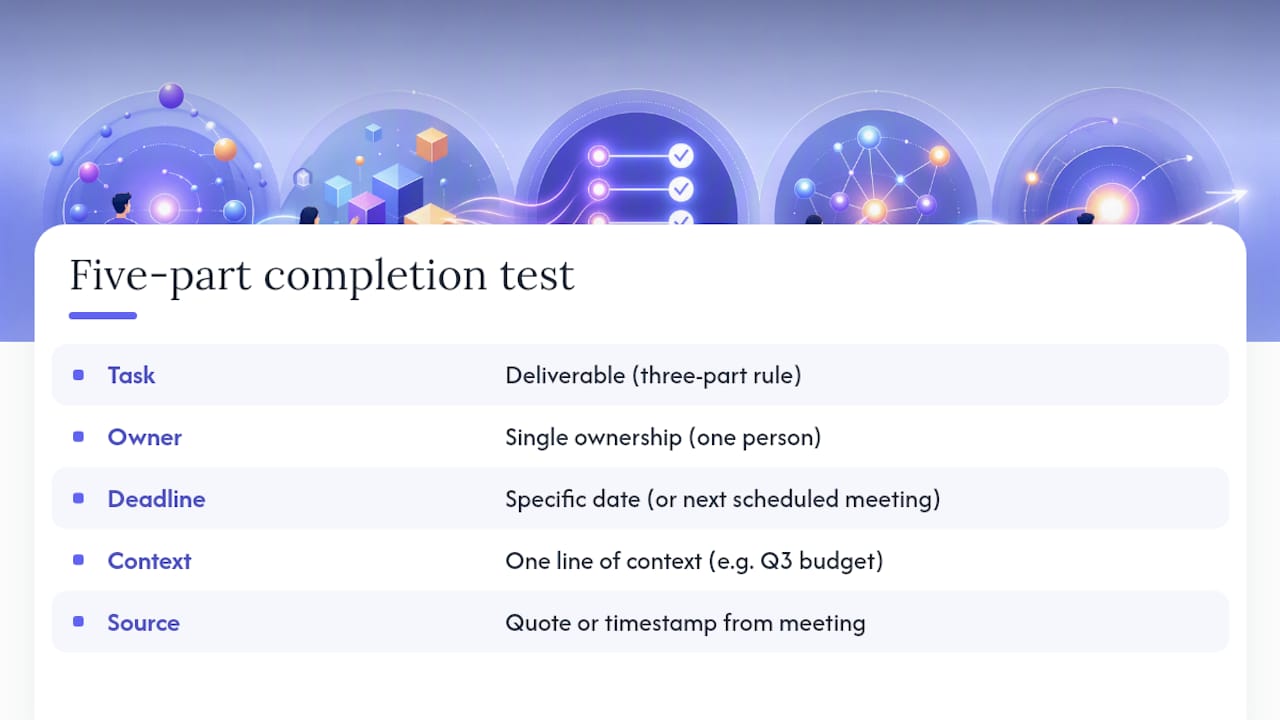
| Five-part completion test | Check task, owner, deadline, context, and source before sending any recap. |
| Single source of truth | Items tracked in a shared tool, not a private inbox, stay visible and get completed. |
| Trailercast for sales teams | Trailercast auto-extracts action items from call transcripts and routes them into your deal workspace. |
Table of Contents
- What are post-meeting action items, and why do they matter?
- Core principles that make action items work across any team
- How to write clear action items: a step-by-step process with a reusable template
- What to send after the meeting and when
- How to track, update, and close action items without losing anything
- Where teams commonly fail with action items and how to fix it fast
- How Trailercast automates capture-to-closure for sales teams
- The discipline most teams skip
- Automate your capture-to-closure workflow with Trailercast
- Sources
What are post-meeting action items, and why do they matter?
Most meeting notes are a mix of three things: observations, decisions, and tasks. Knowing which is which changes what you do with them.
- A note records what was said: “The team discussed Q3 budget concerns.”
- A decision records what was agreed: “We will freeze new hires until Q4.”
- An action item records what must be done, by whom, and when: “Marcus will update the headcount model and share it with Finance by August 14.”
Only the third one drives execution. Notes and decisions are context; action items are commitments. According to Indeed’s meeting action items template, a meeting action-items list is the document that captures tasks assigned to attendees after the meeting, typically with a timeframe for completion and any extra context needed to complete the task.
Teams that confuse notes with action items end up re-litigating the same decisions in the next meeting. Properly captured tasks reduce rework, cut misalignment, and give everyone a shared picture of who is responsible for what. That clarity is the whole point.
Core principles that make action items work across any team
The three-part rule (owner, deliverable, deadline) is the floor, not the ceiling. Here is what each element actually does for you, plus a few principles that separate teams that follow through from teams that just document.
Single ownership is non-negotiable. When two people share an item, each assumes the other is handling it. If the work genuinely requires two people, split it into two separate items with two separate owners. One person coordinates; the other executes. Both have their name on a line.
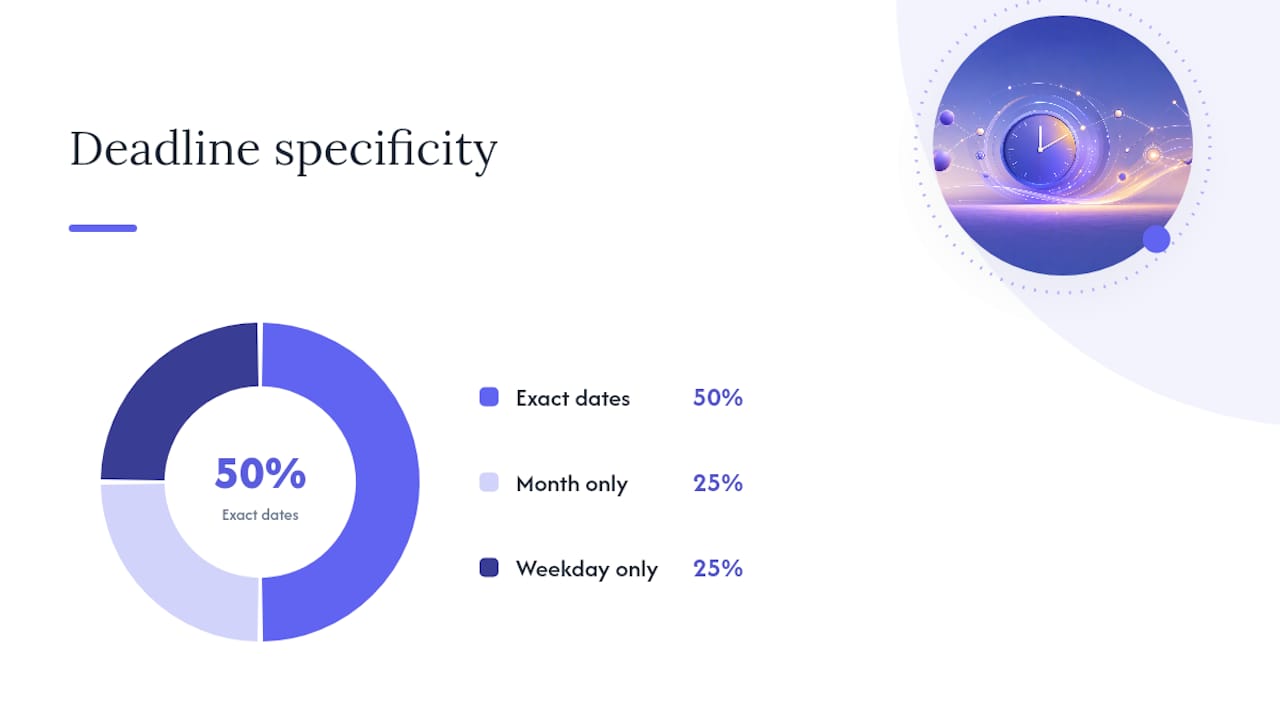
Deadlines need to be real. “ASAP” and “end of month” are not deadlines. A deadline is a specific date, and ideally a time. If you genuinely cannot set a date in the meeting, the default rule is: by the next scheduled meeting. That gives the item a natural review point.
Context prevents the 48-hour blank stare. The owner will open their task list two days later and wonder what they agreed to. One line of context, “per the Q3 budget discussion,” or a timestamp from the recording, is enough to jog memory and prevent a clarifying email that delays the whole thing.
Visibility means the item lives somewhere everyone can find it. A follow-up email buried in one person’s inbox is not a system. Berkeley’s BPMO guidance makes the case that clear agendas and explicit meeting structure increase the odds that meetings produce items with assigned owners and deadlines, rather than loose discussion that dissipates by Tuesday. The same logic applies to where those items land after the meeting.
Pro Tip: Before hitting send on the recap, run the five-part completion test: task, owner, deadline, context, and source (a quote or timestamp from the meeting). If any field is blank, fix it first. A 30-second check here prevents a week of follow-up confusion.
How to write clear action items: a step-by-step process with a reusable template
Writing good action items is a skill, and like most skills, it gets faster with a repeatable process. Here is one that works whether you are running a weekly standup or a multi-stakeholder sales review.
The four-step capture process
- Capture during the meeting. Do not wait until the meeting ends. When someone says “I’ll handle that,” write it down immediately with their name and ask for a date before the conversation moves on.
- Test each item against the five-part completion test. Task, owner, deadline, context, source. If AI transcription is involved, a short verification pass of 30–60 seconds catches most errors and prevents hallucinated owners or outdated deadlines from going out.
- Verify with the owner before the meeting ends. Read the item back. “Marcus, I have you sending the updated headcount model to Finance by August 14. Does that work?” Thirty seconds of confirmation prevents a week of back-and-forth.
- Record in the single source of truth. That might be a shared doc, a project management tool, or a CRM. Wherever it goes, it must be visible to everyone who needs to track it.
Reusable meeting action item template
| Field | What to fill in |
|---|---|
| Task | The specific deliverable (verb + noun) |
| Owner | One person’s name |
| Deadline | Specific date (and time if relevant) |
| Context | One-line rationale or meeting reference |
| Source | Timestamp or quote from the recording |
| Dependencies | What must happen first, if anything |
Example action items across meeting types
| Task | Owner | Deadline | Context |
|---|---|---|---|
| Send revised pricing deck to procurement | Sarah | Friday | Per Q3 pricing review |
| Schedule security review with CISO | James | Aug 20 | Prospect flagged compliance gap |
| Update headcount model and share with Finance | Marcus | Aug 14 | Q3 budget freeze discussion |
| Draft onboarding checklist for new CS hire | Priya | August | CS team expansion approved |
Splitting multi-person work: if a task genuinely needs two people, assign the deliverable to one owner and the dependency to the other. “Jordan will draft the contract (by Aug 18); Alex will provide legal sign-off (by Aug 20)” is two clean items, not one messy shared one.
Setting realistic deadlines means accounting for the owner’s existing workload. If someone is already carrying five open items, a two-day deadline on a new one is optimistic. Ask in the meeting: “Is that timeline realistic given what you have on your plate?”
What to send after the meeting and when
Speed matters more than polish. Recaps sent the same day, or within 24 hours, correlate with higher completion rates for action items. A follow-up that arrives three days later, after the meeting has faded from memory, is fighting an uphill battle.
Kuno’s meeting follow-up guidance recommends keeping the follow-up to 150–250 words, leading with action items rather than a summary of the conversation, and using a five-part structure that works across meeting types.
The five-part follow-up structure
- Appreciation (one sentence): Thank attendees for their time.
- Recap (two to four lines): The two or three most important things discussed.
- Decisions (bulleted): What was agreed.
- Action items (bulleted, with owner and deadline): The tasks going forward.
- Next step (one sentence): When you meet again or what happens next.
Subject-line formulas
- Internal team: “[Meeting name] recap + action items — [Date]”
- Client or prospect: “Next steps from our [topic] conversation — [Date]”
- Governance or board: “[Meeting name] — decisions and assigned tasks — [Date]”
Follow-up cadence for non-responders
- Day 3: A short nudge. “Just checking in on [task]. Let me know if anything has changed.”
- Day 7: Add value. Share a resource, a relevant update, or a revised deadline if circumstances have shifted. Then pause.
Chasing more than twice in a week signals urgency without adding information. If an item is genuinely blocked, escalate it rather than nudging the same person repeatedly.
A note on formal meetings: for board-level or governance meetings where records carry legal weight, ISO standards for meeting records provide a framework for structuring minutes and document control that goes beyond a standard follow-up email.
How to track, update, and close action items without losing anything
A follow-up email is a starting point, not a tracking system. Once items are sent, they need a home where status is visible, updates are easy, and nothing quietly disappears.
Standard status definitions
| Status | What it means in practice |
|---|---|
| Not started | Assigned but work has not begun |
| In progress | Owner is actively working on it |
| Blocked | Waiting on a dependency or decision |
| Completed | Deliverable submitted and confirmed |
“Blocked” is the status most teams skip, and it is the most useful one. An item that sits at “in progress” for two weeks is probably blocked. Naming that status surfaces the problem so someone can remove the obstacle.
Recommended repository options
Where you track items should match where your team works. A shared Google Doc or Notion page works for small teams. Asana, Monday.com, or Jira work for teams that already manage projects there. For B2B sales teams, the CRM is often the right home, because that is where deal context lives. The Microsoft Work Trend Index documents the growing adoption of tools that integrate meeting outputs directly into the systems where work happens, and the pattern is consistent: teams that route action items into their existing workflows complete more of them.
The capture-to-closure workflow
- Capture: Record during the meeting, test against the five-part completion test.
- Confirm: Verify with the owner before the meeting ends.
- Track: Log in the single source of truth with status “not started.”
- Nudge: Day 3 check-in if no update; day 7 follow-up with added context.
- Close: Owner marks complete; meeting lead confirms the deliverable was received.
The meeting lead owns the workflow. The owner owns the task. Those are two different responsibilities, and conflating them is one of the most common reasons items slip.
Where teams commonly fail with action items and how to fix it fast
Most breakdowns are predictable. Here are the ones that show up most often, and what to do about each.
- Vague tasks (“follow up on the proposal”): Fix by adding a verb and a noun. “Send the revised proposal to [name] by [date].”
- Missing deadlines: Default to “by next meeting” when no date is set. It is not perfect, but it is better than nothing.
- Split ownership (“the team will handle it”): Assign one person. If that conversation is uncomfortable, have it in the meeting rather than after.
- Follow-up sent too late: Send the recap the same day. If that is not possible, send it within 24 hours. Every hour of delay reduces the chance the item gets done.
- Items living in private email threads: Move them to a shared tool. Follow-ups trapped in one person’s inbox are invisible to everyone else, and invisible items do not get completed.
- Too many meetings, too many items: HBR’s analysis of meeting overload argues that excess meetings dilute a team’s capacity to execute. Fewer, better-structured meetings produce fewer, higher-quality action items. The HBR meeting cost calculator is a useful reality check on whether a recurring meeting is worth the time it consumes.
How to handle overdue or disputed items
When an item is overdue, the first question is whether it is blocked or just deprioritized. A quick message works: “I see [task] is still open. Is there anything blocking you, or should we adjust the deadline?” That framing invites honesty rather than defensiveness.
For disputed items (“I don’t think I agreed to that”), the meeting recording or transcript is the source of truth. This is one reason timestamps matter.
First five minutes of the next meeting
Open every meeting with a two-minute action item review. Read each open item, confirm status, and flag anything blocked. This single habit, done consistently, is more effective than any reminder system because it creates public accountability. Teams that skip this step tend to re-open the same conversations every week.
How Trailercast automates capture-to-closure for sales teams
For B2B sales teams, post-meeting action items are not just an internal coordination problem. They are a deal risk. A missed follow-up task after a discovery call can mean a prospect goes cold. An untracked commitment from a demo can become a trust issue at contract time.
Trailercast’s AI call notetaker joins Zoom, Google Meet, and Microsoft Teams automatically, transcribes every speaker, and extracts structured action items with owners, deadlines, and context from the conversation. No manual note-taking. No post-meeting scramble to remember who said what.
Here is what the workflow looks like in practice:
- Capture: The AI notetaker joins the call and produces a speaker-by-speaker transcript.
- Extract: Structured action items are pulled from the transcript, with owner, deliverable, deadline, and a source quote.
- Route: Items feed into the deal’s workspace alongside the call summary, qualification verdict, and Deal Brief.
- Track: The Trailercast sales engagement platform keeps all items visible to the full account team, not just the rep who was on the call.
- Follow up: Automated follow-up drafts go out with the action items already formatted and attributed, so the rep sends a polished recap in seconds rather than minutes.
The teams that benefit most are B2B sales, RevOps, and account management teams running multi-stakeholder deals. When a CFO, a CISO, and a procurement lead are all involved in a single deal, keeping action items visible across the buying committee is the difference between a deal that moves and one that stalls.
Pro Tip: After any AI extraction, spend 30 seconds verifying owner names and deadlines before sending. AI catches most items, but a quick human check prevents a misattributed task from going to the wrong person.
The discipline most teams skip
Here is what I keep seeing: teams invest in better meeting tools, better agendas, better templates, and still end up in the same place two weeks later, re-discussing the same open items. The process is not the problem. The habit is.
The capture-to-closure discipline works when it is non-negotiable, not when it is aspirational. That means the five-part completion test runs on every item, not just the important ones. It means the follow-up goes out the same day, not when someone finds time. It means the first five minutes of every subsequent meeting are spent on open items, not on re-introductions.
The measurable difference is real. Teams that adopt this discipline consistently report less rework, faster decision cycles, and clearer accountability across the board. The tools help. The AI helps. But the habit is what makes it stick.
Automate your capture-to-closure workflow with Trailercast
If you are running B2B sales meetings and still manually writing up action items after every call, you are spending time on a task that should take seconds, not minutes.

Trailercast captures every commitment made on a call, extracts it into a structured action item with owner and deadline, and routes it into your deal workspace automatically. Your team gets a polished follow-up ready to send before the next meeting is even scheduled. No missed commitments. No “I thought you were handling that” moments at the worst possible time in a deal cycle.
B2B sales teams and RevOps leaders at companies with 11–200 employees use Trailercast to consolidate conversation intelligence, follow-up, deal rooms, and post-close handoff into one workspace. The free trial requires no credit card.
Trailercast and see how much faster your deals move when nothing falls through the cracks.
Sources
The sources below informed this article and offer deeper reading on templates, timing, and workflow integration.
- Meeting action items template (Indeed)
- Meeting Follow-Up: How to Turn a Meeting Into Action (Kuno)
- Making the most of your meetings with agendas and action items (Berkeley BPMO)
- Dear manager—you’re holding too many meetings (HBR)
- Microsoft Work Trend Index (Microsoft WorkLab)