Tech Stack Consolidation: A CFO-and-RevOps Playbook

Consolidate the tools that duplicate workflows and cost more than they deliver, and start with a focused audit this quarter. That single move, done well, is the fastest path to reclaiming budget and killing the toggling tax your team pays every day.
Your next step is not a strategy offsite. It’s a two-week audit: owner, spend, active users, renewal date, and integrations for every tool in the stack. Once that list exists, three quick wins usually surface immediately.
- Reclaim licenses nobody has touched in 60 days.
- Kill auto-renewals you can’t justify to your CFO in one sentence.
- Merge duplicate collaboration or reporting tools doing the same job under different logos.
Key Takeaways
Tech stack consolidation works because it converts scattered spend and fragmented data into measurable, trackable ROI when sequenced around renewals and validated with parallel runs.
| Point | Details |
|---|---|
| Audit before you cut | Collect owner, spend, active users, renewal date, and integrations for every tool this quarter. |
| Sequence around renewals | Time migrations to renewal windows to avoid paying for overlapping tools and to gain negotiating leverage. |
| Prioritize by impact and effort | Cut low-effort, high-impact tools first to build momentum before tackling complex migrations. |
| Protect against disruption | Run parallel systems during pilots and validate data before decommissioning anything. |
| Consolidate the sales stack directly | Platforms like Trailercast replace conversation intelligence, demo editing, deal rooms, and follow-up video in one workspace. |
Table of Contents
- What Is Tech Stack Consolidation?
- Why Does Tech Stack Consolidation Matter Right Now?
- What Are the Real Benefits of Tech Stack Consolidation?
- How Do You Know If It’s Time to Consolidate?
- How Do You Build a Tech Stack Consolidation Framework?
- What Should You Look For When Selecting a Consolidation Platform?
- What Are the Biggest Risks in Consolidation, and How Do You Mitigate Them?
- How Do You Measure the ROI of Tool Consolidation?
- What Does Sales Stack Consolidation Look Like in Practice?
- What’s a Realistic Timeline for Consolidation?
- Why Strategic Consolidation Beats Chasing New Tools
- A Simpler Way to Run Your Sales Stack
- Frequently Asked Questions
- Sources
What Is Tech Stack Consolidation?
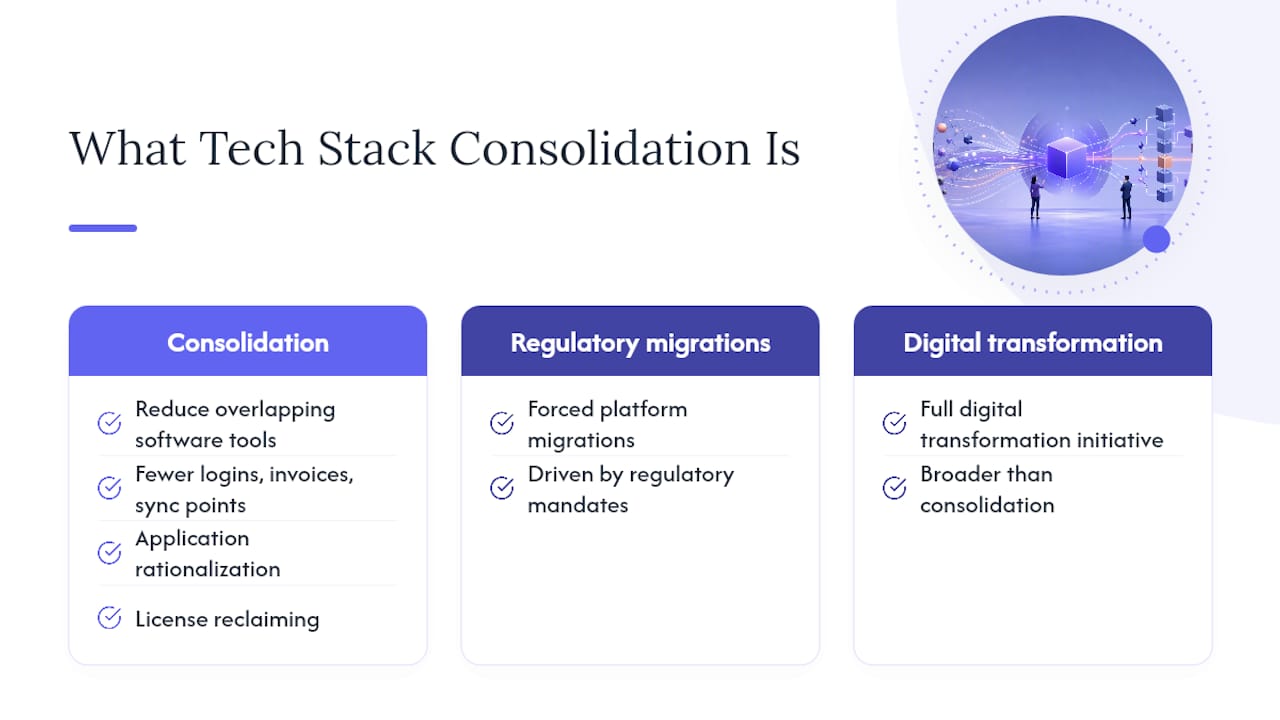
Tech stack consolidation means reducing the number of overlapping software tools your organization pays for and replacing redundant point solutions with fewer, better-integrated platforms. In practice, that covers application rationalization (deciding what stays, what goes), license reclaiming (cutting seats nobody uses), and contract consolidation (rolling several vendor agreements into one negotiated deal).
It does not mean forced platform migrations driven by regulatory mandates, and it’s not the same as a full digital transformation initiative. Consolidation is narrower and more tactical: fewer logins, fewer invoices, fewer places data can drift out of sync.
The scope spans SaaS applications, point solutions bought by individual teams, third-party data feeds, middleware connecting systems, and the custom integrations your engineers built to duct-tape everything together. You’ll also hear this called application rationalization, SaaS optimization, or spend consolidation. The terms overlap because they’re solving the same root problem from different angles: finance cares about spend, IT cares about integration debt, and ops cares about workflow friction. Sales tech stack consolidation is simply this same discipline applied to the revenue org, where tool sprawl tends to run especially deep.
Why Does Tech Stack Consolidation Matter Right Now?
The average enterprise now runs 305 SaaS applications, according to Zylo’s 2026 SaaS Management Index, and most companies lack the visibility to manage that footprint effectively. That’s not a rounding error. That’s hundreds of renewal dates, hundreds of admin consoles, and hundreds of places where a departing employee’s access can quietly linger.
Cloud spend is climbing at the same time. Gartner forecasts worldwide public cloud end-user spending to hit $723 billion in 2025, and that growth trajectory continues into 2026. Budget owners are under real pressure to show where every dollar goes, and “we’re not sure which tools our team actually uses” is not an answer anyone wants to give in a board meeting.
The operational risk compounds the financial one. Consider what’s piling up while you wait:
- Integration debt: every unconsolidated tool adds another API dependency that can break silently.
- Security and compliance gaps: shadow SaaS purchased outside procurement rarely gets a security review.
- Decision delays: data scattered across five systems means nobody trusts the number in the room.
- Productivity loss from context switching: Harvard Business Review’s research on app toggling shows how much time and cognitive energy gets burned simply moving between tools that should be one workflow.
AI-native platforms are accelerating this shift, too, absorbing capabilities that used to require three or four separate point tools. Procurement teams are scrutinizing renewals harder than they did two years ago. Waiting another quarter usually means renewing something you’re about to cut anyway.
What Are the Real Benefits of Tech Stack Consolidation?
The ROI of tool consolidation shows up in three places: your P&L, your team’s calendar, and your data warehouse. Each stakeholder in the room cares about a different one, and knowing which lever to pull for whom makes the internal pitch dramatically easier.
Direct cost savings come first because they’re the easiest to prove. Reclaiming unused licenses alone often recovers meaningful budget within a single billing cycle. Rework’s SaaS consolidation guide notes that spend consolidation, meaning rolling multiple vendor contracts into fewer, better-negotiated agreements, typically delivers the largest immediate savings of any consolidation tactic. Combine that with reduced vendor fees from volume discounts, and finance sees the win almost immediately.
Operational gains take longer to show up but compound over time. Fewer integrations mean fewer points of failure. New hires onboard faster when they’re learning one platform instead of stitching together training across six logins. Admin time drops because your ops team isn’t manually reconciling data between tools that were never meant to talk to each other. Data quality improves simply because there are fewer places for the same customer record to diverge.
Here’s how those gains map to the people who need to hear about them:
- Finance (CFO): consolidated contracts, lower total software spend, cleaner forecasting because fewer subscriptions means fewer surprise renewals.
- IT: reduced integration surface area, fewer security review cycles, simpler SSO and access management.
- Sales/RevOps (CRO): less time spent updating five systems after every call, faster rep ramp time, more reliable pipeline data because it lives in one place instead of being reconstructed from exports.
Coupa’s CFO guide to tech stack consolidation frames this well: consolidated spend platforms give finance leaders real visibility and tie directly to stronger cash flow, not just a tidier vendor list.
How Do You Know If It’s Time to Consolidate?
You don’t need a consultant to tell you the stack has sprawled. A few numbers usually make the case on their own.
Pull these together before you make the argument to leadership:
- Apps per employee, if that number is climbing past 10, you likely have redundant tools mapped to the same workflow.
- Percentage of licenses that have gone unused in the past 60 to 90 days, above 20% is a common trigger point.
- How many tools in the same category (two CRMs, three e-signature apps, four project trackers) are doing overlapping jobs.
You can gather most of this from expense reports, SSO login logs, procurement records, and a short employee survey asking what they actually open every day versus what they were issued at onboarding. If your SSO logs show a tool with near-zero logins but a live annual contract, that’s your first cut candidate.
How Do You Build a Tech Stack Consolidation Framework?
This is where most consolidation efforts stall: not from lack of will, but from lack of sequence. A workable framework has seven steps, and skipping any of them is usually why the “big consolidation project” from two years ago quietly died.
- Set goals. Decide upfront whether you’re optimizing for cost, integration simplicity, or data unification. Trying to do all three at once dilutes the pitch to stakeholders.
- Build the inventory. Every tool, every owner, every dollar. No exceptions for the tool a VP swears is “mission critical” without data to back it.
- Score each tool. Rate usage, business impact, and overlap with other tools in the same category.
- Prioritize by impact versus effort. Cut the easy, low-impact tools first to build momentum before tackling the harder migrations.
- Pilot the replacement. Run a small team through the new tool in parallel with the old one before a full cutover.
- Migrate. Sequence this around contract renewals, not around convenience.
- Embed governance. Without an approval gate for new tool requests, the stack sprawls right back within a year.
Your audit template needs specific fields to be useful, not just a spreadsheet with tool names in column A. Here’s the structure worth building:
| Audit Field | Why It Matters |
|---|---|
| Owner / department | Identifies who to loop into the decision and who will resist cutting it. |
| Annual spend | Enables direct cost comparison across overlapping tools. |
| Active users (last 90 days) | Reveals real adoption versus issued-but-unused seats. |
| Renewal date | Determines your negotiating leverage and cutoff timeline. |
| Integrations | Flags how disruptive removal will be to connected systems. |
| Data sensitivity | Signals which migrations need extra security review. |
| Business criticality | Separates “nice to have” from “the team can’t function without it.” |
Once scored, plot tools on a simple impact-versus-effort matrix. Low-effort, high-impact cuts (an unused analytics dashboard, a duplicate note-taking app) go first, both because they’re easy wins and because early momentum makes the harder conversations easier later. High-impact, high-effort consolidations (replacing your CRM’s satellite tools, merging two overlapping platforms your biggest accounts depend on) get sequenced against renewal dates so you’re not paying for two systems simultaneously any longer than necessary.
Before a full migration, run a pilot with a small, willing team for two to four weeks. Keep the old tool live in parallel so nobody loses critical data or workflow continuity if the new tool has a gap you didn’t anticipate. This “parallel run” approach, recommended in Rework’s consolidation guide, is the single best defense against the two failure modes that kill consolidation projects: data loss and user revolt.
Pro Tip: Assign a “champion” on each affected team before you announce anything. Someone who already believes in the new tool and can answer peer questions informally will do more to reduce pushback than any top-down mandate. Pair that with phased training scheduled around, not during, your busiest sales weeks, and time your final migration date to land right before a contract renewal so you’re not paying for both tools past the cutover.
What Should You Look For When Selecting a Consolidation Platform?
Once you’ve decided what to cut, the harder question is what to consolidate into. The tradeoffs between an all-in-one platform and a curated best-of-breed stack come down to a handful of concrete criteria.
Run every serious candidate through this checklist:
- Integration breadth: does it connect to your CRM, calendar, and communication tools without custom engineering work?
- Single sign-on and SCIM support: this determines how much IT overhead the platform adds versus removes.
- Data model and APIs: can you actually get your data out if you leave? Open APIs matter more than marketing decks suggest.
- Security and compliance posture: SOC 2, data residency options, and audit log depth, especially important if you’re consolidating anything touching customer data. Trailercast’s own security documentation is a useful example of the kind of detail worth demanding from any vendor.
- Migration tooling and support: does the vendor have a real onboarding team, or are you on your own with a knowledge base article?
Model total cost of ownership beyond the subscription line: migration labor, training time, the period you’ll run both old and new tools in parallel, and the ongoing admin hours you’ll save once consolidation is done.
| Approach | Strength | Tradeoff |
|---|---|---|
| All-in-one platform | Fewer integrations, one login, unified data model | Less flexibility for highly specialized workflows |
| Best-of-breed stack | Best tool for each specific task | Higher integration overhead, more admin burden |
Neither approach is universally right. But for teams drowning in integration debt, an all-in-one platform usually wins on total cost once you factor in the admin hours a fragmented stack quietly consumes.
What Are the Biggest Risks in Consolidation, and How Do You Mitigate Them?
Every consolidation project carries real risk, and pretending otherwise is how projects lose executive support halfway through.
- Data loss: validate every migrated record against the source system before decommissioning it, and never delete the old tool’s data until validation passes.
- Vendor lock-in: negotiate data export guarantees into the contract before you sign, not after you need to leave.
- User resistance: address this with the champion and parallel-run tactics covered above, not with a mandate email.
- Compliance gaps: build a legal checklist for termination clauses, including data deletion confirmation from the outgoing vendor, before migration day.
- Service disruption during cutover: define a rollback plan in writing before you flip the switch, not while it’s failing.
Pro Tip: Lock your cut list 90 days before the relevant renewal window opens. That gives you leverage to demand prorated refunds instead of eating the full annual cost, and it gives the outgoing vendor no room to lock you into another year through a slow-walked cancellation process.
How Do You Measure the ROI of Tool Consolidation?
The ROI formula for consolidation is straightforward once you’ve collected the right inputs: annual savings from canceled licenses, plus admin time reclaimed (valued at loaded hourly cost), plus productivity gains from reduced context switching, minus total migration costs including training and any parallel-run overlap. That net number is what you bring to the CFO, not just “we cut three tools.”
Track these core KPIs from day one of the project:
- Total SaaS spend, tracked monthly during migration.
- Tools per user, a number that should be trending down.
- Active-seat utilization rate across your remaining platforms.
- Mean time to onboard a new hire onto the tech stack.
- Number of live integrations, fewer is the goal here.
- Support tickets related to tooling confusion or breakage.
Report weekly or monthly during the active migration window, then shift to quarterly reviews once the dust settles. Your dashboard should show spend trend, utilization rate, and open migration tasks side by side, so leadership sees progress without asking for a special update.
What Does Sales Stack Consolidation Look Like in Practice?
Sales teams tend to have the worst tool sprawl of any department, because every rep, sales engineer, and RevOps hire has historically been free to bolt on their own favorite point solution. A typical sales stack ends up running separate tools for conversation intelligence, demo recording and editing, buyer-facing deal rooms, async video follow-up, and quarterly business review prep, five different logins for five stages of the same deal.
Industry playbooks on sales tech stack consolidation describe this exact pattern: teams commonly map a dozen overlapping tools down to a much smaller core set without losing capability, just losing the friction between them. A platform like Trailercast illustrates the feasibility directly, replacing that entire five-tool chain with one workspace where a single AI thread follows the deal from the first discovery call through post-close handoff.

Here’s how the categories typically map:
| Point-Tool Category | Consolidated Capability |
|---|---|
| Conversation intelligence / call notetaking | AI notetaker with speaker-by-speaker transcripts and qualification verdicts |
| Demo recording and editing | AI-edited trailer built from the actual sales call, personalized per stakeholder |
| Buyer-facing deal room | Branded decision room with engagement tracking and champion attribution |
| Async video follow-up | Trackable follow-up video tied to the same deal thread |
| QBR prep | AI-generated review briefs pulled from the full deal history |
Teams piloting this kind of consolidation should expect a few realistic short-term disruptions: reps relearning where to find deal history, a week or two of double logging during the parallel run, and some grumbling from your longest-tenured AE who liked the old tool fine. Expect improvements in tools-per-deal reduction and faster time-to-first-touch once the pilot team is fully ramped, typically measured over a 60 to 90 day window against the prior quarter’s baseline.
What’s a Realistic Timeline for Consolidation?
A three-wave rollout keeps risk contained while building the internal case for the next wave.
- Pre-migration (weeks 1 to 3): complete the audit, score tools, secure budget approval, and select a pilot team.
- Wave one, pilot (weeks 4 to 8): migrate one team, run parallel systems, gather feedback, and fix workflow gaps.
- Wave two, core teams (months 3 to 4): expand to the broader department, tied to any relevant contract renewal dates.
- Wave three, company-wide (months 5 to 6): full rollout with governance rules in place to prevent new tool sprawl.
Assign clear ownership: one person owns the inventory, procurement owns vendor negotiations and approvals, IT owns migration and security review, and a designated champion on each team owns training and adoption. Gate each wave with a review tied to usage data and renewal timing, not just a calendar date, before greenlighting the next one.
Why Strategic Consolidation Beats Chasing New Tools
Most organizations treat tool sprawl as a series of individual purchasing decisions instead of what it actually is: a compounding tax on clarity. Every new point solution someone adds without a documented gap analysis makes the next consolidation project harder, not easier. The strategic win isn’t cutting tools for the sake of a tidier invoice. It’s giving your CFO, your reps, and your IT team a single source of truth they can actually trust.
Pro Tip: Lock your cut list 90 days before your biggest renewal window, and require anyone requesting a new tool to submit a documented overlap analysis first. That one governance rule prevents most of the sprawl that forces you back into this exercise again in eighteen months.
A Simpler Way to Run Your Sales Stack
If your sales team is running separate tools for call recordings, demo editing, deal rooms, and follow-up video, you’re paying five subscription bills and stitching together data by hand every time a deal moves forward. Trailercast replaces that entire chain with one workspace, at a single pricing tier with every feature included, no gating one capability behind an enterprise upsell.

The fit is clearest for B2B SaaS teams with multi-stakeholder deal cycles, typically three to seven people on the buying committee, at companies between 11 and 200 employees. If your CRO or RevOps lead is the one who owns the stack decision, Trailercast’s feature set maps directly onto the point tools you’re likely already paying for separately: an AI notetaker for discovery calls, auto-edited demo trailers, and buyer-facing decision rooms that track who’s actually engaging with your content after the call ends.
Start a free trial, no credit card required, and see how many logins your team can retire in the first month.
Frequently Asked Questions
What is tech stack consolidation in simple terms? It’s the process of cutting redundant software tools and merging overlapping platforms into fewer, better-integrated systems, reducing cost, admin overhead, and data fragmentation.
How long does a typical consolidation project take? A phased rollout usually spans five to six months from initial audit through company-wide adoption, split across a pilot wave, a core-team wave, and a full rollout tied to renewal timing.
What’s the biggest mistake teams make when consolidating? Skipping the pilot and parallel-run phase. Cutting straight to a full migration without validating data and workflows first is the most common cause of stalled projects and user revolt.
Does consolidating tools always save money immediately? Direct license savings often show up within one billing cycle, but the larger ROI, admin time reclaimed and productivity gained from reduced context switching, typically compounds over two to three quarters.
Should sales teams consolidate differently than other departments? The same audit and prioritization framework applies, but sales stacks tend to have more overlap across conversation intelligence, demo tools, and deal rooms, making unified platforms particularly high-impact for revenue teams specifically.
Sources
The Zylo SaaS Management Index supplied the enterprise application count and framing for scope and urgency. Gartner’s cloud spending forecast grounded the budget-pressure argument. Harvard Business Review’s toggling research backed the productivity case. Coupa’s CFO guide shaped the finance-stakeholder framing, and Rework’s consolidation guide provided the scoring and sequencing framework used throughout the playbook.
- Tech Stack Consolidation: A Strategic Guide
- Gartner forecasts worldwide public cloud end-user spending to total $723 billion in 2025
- How much time and energy do we waste toggling between applications?
- SaaS Consolidation: When to Cut a Tool vs. Keep It