Sales Automation Tools for B2B Teams in 2026

Sales automation tools are software solutions that replace manual, repeatable sales tasks with automated sequences, freeing your team to focus on the conversations that actually close deals. The core promise is efficiency at scale: a 10-person team equipped with the right automation can match the output of a 25-person team by handling lead capture, scoring, routing, sequence enrollment, deal management, and CRM hygiene automatically. For B2B sales teams managing multi-stakeholder buying committees, that multiplier is not a nice-to-have. It is the difference between a deal that moves and one that stalls in someone’s inbox.
What are the essential workflows automated by sales automation tools?
Automated workflows ensure repeatable sales tasks happen consistently and immediately, without human error. That consistency prevents leads from decaying in the funnel, which is the silent killer of most B2B pipelines. The six workflows below form the backbone of any serious sales automation setup.
-
Lead enrichment and data validation. The moment a new contact enters your CRM, automation pulls firmographic and technographic data to fill in missing fields. This gives your reps context before the first call, not after.
-
Lead scoring based on ICP criteria. Automation scores every inbound lead against your Ideal Customer Profile using attributes like company size, industry, tech stack, and funding stage. Reps stop wasting time on leads that will never convert.
-
Lead routing and notification triggers. High-scoring leads route instantly to the right rep or territory, with a Slack or email alert fired in real time. Speed to lead is a direct revenue driver in competitive B2B markets.
-
Sequence enrollment for personalized outreach. Once a lead is routed, automation enrolls them in a tailored multi-touch sequence across email, phone, and LinkedIn. The sequence runs on a schedule without the rep manually tracking each step.
-
Deal stage progression and CRM hygiene. When a prospect books a meeting or opens a proposal, automation moves the deal to the next stage and logs the activity. Your pipeline stays accurate without reps doing data entry after every call.
-
Activity logging and pipeline analytics. AI sales automation integrates meeting notes, call recaps, and performance tracking into CRM timelines automatically. Managers get clean data for forecasting without chasing reps for updates.
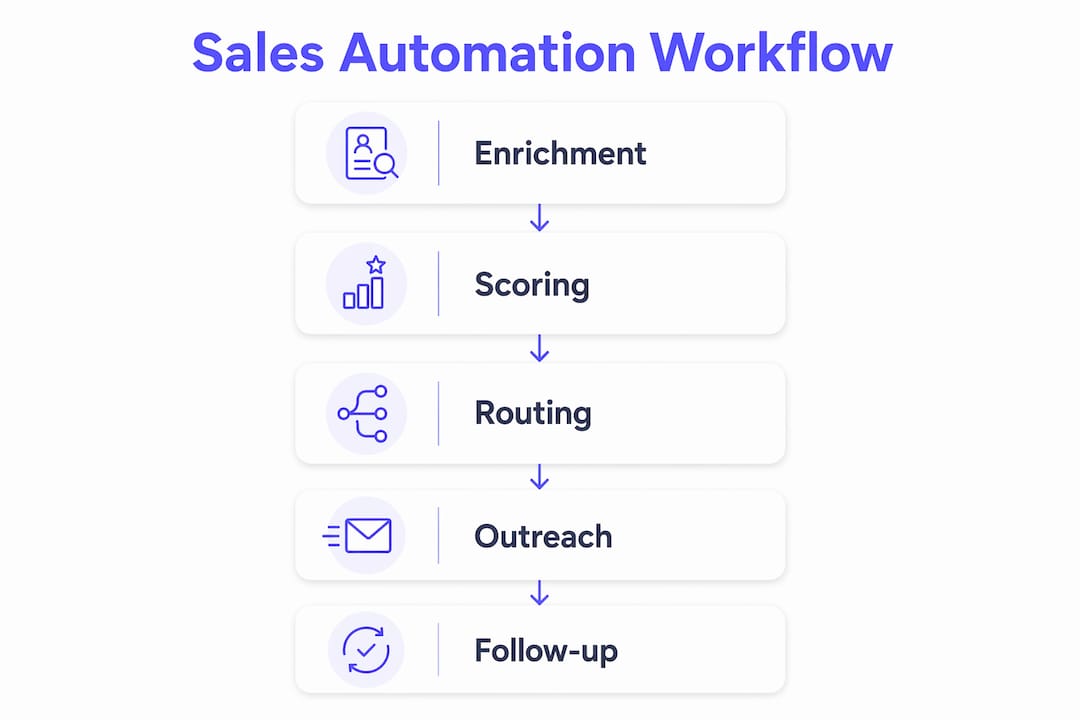
Pro Tip: Build your workflows in strict sequence: enrichment first, then scoring, then routing. Each step depends on the data from the previous one. Skipping ahead is the most common reason automation breaks on day one.
How do sales automation tools use buyer intent data?

The best sales automation solutions do more than process your existing contacts. They connect to external data to tell you who is ready to buy right now. Modern platforms integrate massive contact and company databases, with some offering access to over 420 million contacts and 145 million companies, filterable across 300-plus attributes like technology stack and funding data. That scale means your ICP filter can get surgical, not just broad.
Intent signals take targeting further. Automation can trigger personalized outreach when a target account shows specific buying signals:
- Hiring surges in sales or marketing roles signal budget and growth, which means they are likely evaluating new tools.
- Competitor non-renewals indicate an open window where your pitch lands at exactly the right moment.
- Technology stack changes reveal when a prospect has just adopted a complementary platform, making your integration story relevant.
- Funding announcements flag accounts with fresh capital and a mandate to build out their stack.
The catch is data quality. Poor CRM data disrupts revenue cycles regardless of how sophisticated your automation is. Stale records mean intent signals fire against the wrong contacts, sequences go to dead emails, and routing sends hot leads to reps who left the company six months ago. Automation amplifies whatever is in your CRM. If the data is bad, the automation makes the problem worse faster.
Personalized multichannel outreach consistently outperforms high-volume generic messaging in outbound sales. Platforms that include automated email warm-up services protect your sender reputation while you scale, keeping your messages out of spam folders and in front of real buyers.
What are best practices for implementing automation workflows?
Implementation failures almost always trace back to two mistakes: building too fast and testing too little. Full sales automation workflows typically require 2–3 weeks to implement properly, assuming your underlying data is clean. Rushing that timeline to hit a quarter-end deadline is how you end up with broken sequences firing on your best accounts.
Follow these practices to avoid the most common traps:
- Build sequentially. Start with enrichment, confirm it works, then add scoring, then routing. Parallel workflow builds fail because each step depends on the data output of the previous one.
- Test with sample records before go-live. Run at least 10 records through each workflow manually before activating it at scale. One misconfigured filter can mislabel hundreds of leads in minutes.
- Monitor execution logs weekly. Silent failures are the hardest to catch. A workflow can appear active while actually skipping steps due to a field mapping error. Weekly log reviews catch these before they compound.
- Audit CRM data before you build. Automation cannot fix bad data. Deduplicate contacts, validate email addresses, and standardize field values before your first workflow goes live.
- Set a recurring hygiene schedule. Data decays at a meaningful rate in B2B databases. Build a monthly or quarterly review into your operations calendar to keep records current.
Pro Tip: Assign one person as the workflow owner for each automation. When something breaks, you need a single accountable person who knows the logic, not a committee trying to reverse-engineer it under pressure.
What challenges come with automation in multi-stakeholder B2B deals?
Single-buyer sales are straightforward to automate. Multi-stakeholder B2B buying cycles are not. When a deal involves a CFO, a CISO, a VP of Sales, and a procurement team, automation has to do more than send emails. It has to support a coordinated, multi-threaded engagement strategy across different roles with different concerns.
The specific challenges sales teams face in these environments include:
- Balancing speed and personalization. Automation can fire a follow-up within minutes of a demo. But if that follow-up is generic, it signals to a senior buyer that they are just a number. The best automated sales processes use role-based personalization, sending a pricing-focused message to the CFO and a security-focused message to the CISO from the same deal trigger.
- Managing handoffs between sales and marketing. When marketing automation hands a lead to sales, the context often disappears. The rep starts from scratch, the buyer repeats themselves, and trust erodes. Automation that carries conversation history and engagement data across the handoff solves this directly.
- Knowing when to pause automation. A champion who just told you the deal is at risk does not need an automated check-in email. Sales teams need clear rules for when human judgment overrides the sequence.
- Supporting content delivery at the right moment. In complex deals, the right piece of content sent to the right stakeholder at the right time can unblock a stalled evaluation. Automation that tracks per-stakeholder engagement, like the Decision Rooms feature in Trailercast, shows you exactly who has seen what and who needs a nudge.
- Automating the post-close handoff. The deal does not end at signature. Automating the handoff to Customer Success with full deal context, stakeholder maps, and promised features prevents the painful “re-discovery” kickoff that frustrates new customers and wastes CS time.
Trailercast addresses this directly with an AI-generated handoff brief that fires automatically the moment a contract signs, giving CS everything they need without the seller writing a single word.
Key Takeaways
Sales automation tools work best when built on clean data, implemented sequentially, and paired with human judgment in complex multi-stakeholder deals.
| Point | Details |
|---|---|
| Build in sequence | Implement enrichment, then scoring, then routing. Each workflow depends on the previous step’s output. |
| Data quality is foundational | Automation amplifies what is already in your CRM. Fix bad data before you build, not after. |
| Test before scaling | Run at least 10 sample records through each workflow before activating it at full volume. |
| Personalize by stakeholder role | Generic outreach fails in multi-buyer deals. Tailor automated messages to each decision-maker’s specific concerns. |
| Automate the full cycle | The highest-value automation extends beyond lead capture to post-close handoff, keeping CS informed from day one. |
Why I think most teams automate the wrong things first
I have watched sales teams spend weeks building elaborate lead-scoring models before they have even validated their ICP. The automation looks impressive in a demo. It falls apart in production because the underlying logic was never tested against real buyer behavior.
The teams that get the most out of automated sales processes start with the boring stuff: enrichment, deduplication, and routing. Those workflows are unglamorous, but they are the foundation everything else runs on. Once those work reliably, scoring and sequencing become genuinely powerful.
The other mistake I see constantly is treating automation as a substitute for sales strategy. Automation is a multiplier. It makes a good process faster and a bad process fail faster. If your messaging does not resonate, automating it at scale just burns your sender reputation and your prospect list simultaneously.
The teams winning with sales productivity tools in 2026 are the ones who treat automation as infrastructure, not magic. They build it carefully, test it obsessively, and keep a human in the loop for every moment that actually matters to the buyer.
— Daniel
How Trailercast handles the full deal cycle automatically
Trailercast is an AI sales platform built for B2B teams running complex, multi-stakeholder deals. It replaces five disconnected tools with one workspace: conversation intelligence, AI-edited demo trailers, buyer-facing decision rooms, eSignature, and post-close handoff all live in a single deal environment.

Every call is transcribed and summarized automatically. Every demo becomes a personalized, AI-edited trailer your champion can forward to the CFO or CISO who missed the live session. Every stakeholder’s engagement is tracked in real time inside a branded decision room. When the deal closes, an AI Handoff Brief fires to Customer Success instantly. Explore the full platform features or start a free trial at trailercast.io, no credit card required.
FAQ
What are sales automation tools?
Sales automation tools are software platforms that replace manual, repeatable sales tasks with automated sequences covering lead capture, scoring, routing, outreach, and CRM updates. They allow small sales teams to operate at the output level of much larger ones.
What is the difference between CRM automation and sales automation?
CRM automation refers specifically to automating data entry, record updates, and pipeline management inside a CRM system. Sales automation is broader, covering the full workflow from lead enrichment and outreach sequences to deal progression and post-close handoff.
How long does it take to implement sales workflow automation?
A full sales automation workflow typically takes 2–3 weeks to implement correctly, assuming clean CRM data and sequential building from enrichment through scoring to routing.
Why does data quality matter so much for automation?
Poor or outdated CRM data causes automated workflows to misroute leads, fire sequences to invalid contacts, and produce inaccurate pipeline reports. No automation tool can compensate for bad underlying data.
How do sales automation tools support multi-stakeholder B2B deals?
The best platforms support multi-stakeholder deals by enabling role-based personalization, tracking per-stakeholder engagement, managing content delivery at the right moment, and automating handoffs between sales and customer success with full deal context intact.